> ## Documentation Index
> Fetch the complete documentation index at: https://docs.tessact.ai/llms.txt
> Use this file to discover all available pages before exploring further.
# 13 October 2025
> Webhook integration, asset activity logs, improved face tracking, scene exports, and stability improvements.
## Overview
This release introduces **Webhook integration** for powerful external automation and a comprehensive **asset activity log** to monitor all user and AI-automated asset actions. Expect smoother workflows with improved **face tracking** accuracy, streamlined **scene exports**, and broad **stability improvements** throughout the platform.
***
## What's new
### Asset Activity Log in Technical metadata
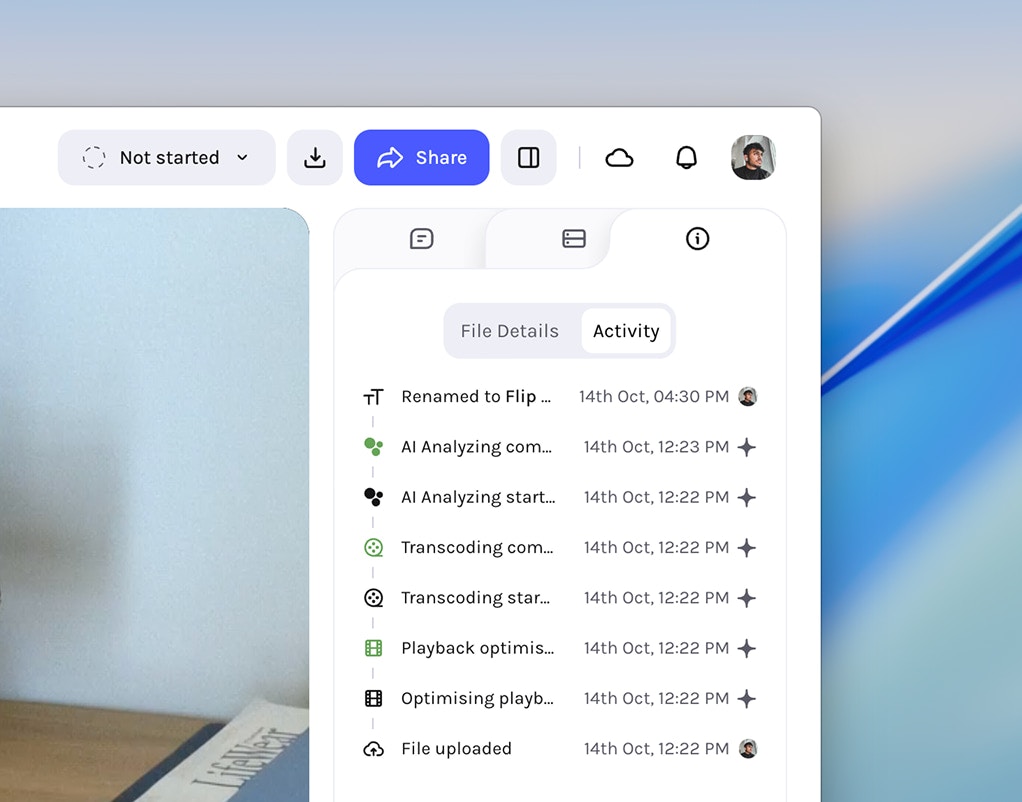
Track user and automated activities for each asset, complete with precise timestamps, inside the **Technical metadata → Activity** tab.
#### Tracked activities
* Upload
* Rename
* Status change
* AI analyzing
* Transcoding
* Playback optimization
 The asset activity log records actions **only for assets uploaded following
this release**; assets added earlier will not have activity history.
***
### Webhook Integration
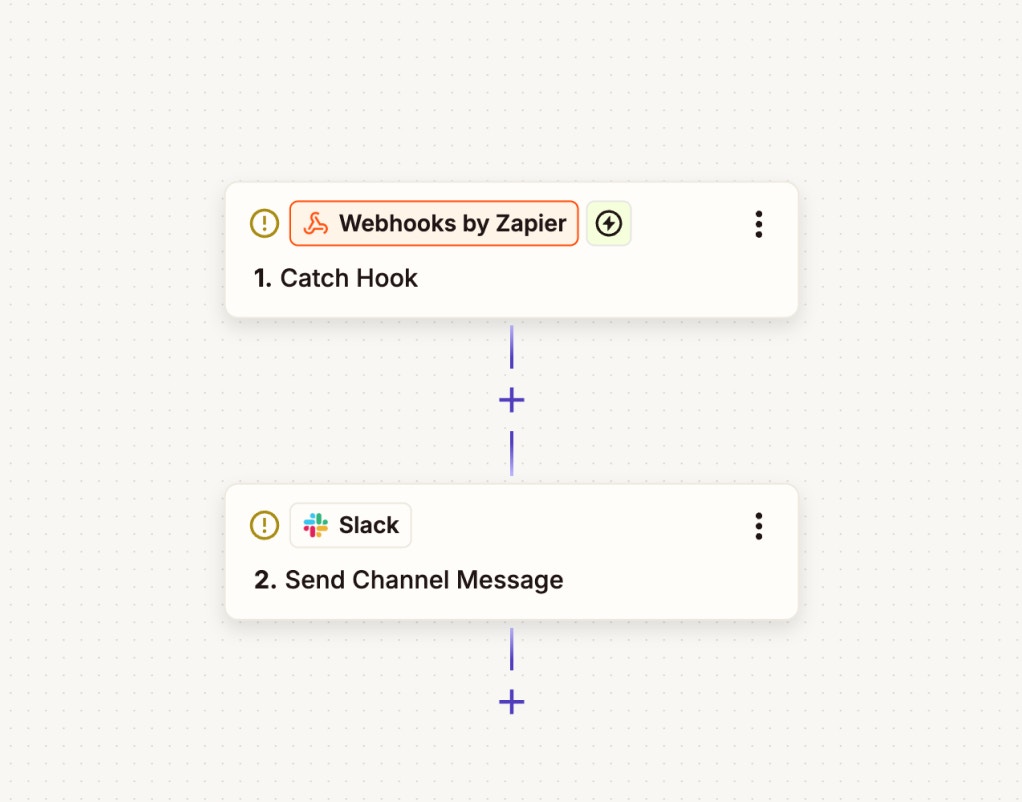
Connect Tessact to your automation workflows via outgoing webhooks. Use popular providers like **Zapier**, **n8n**, **IFTTT**, or your own custom endpoint.
Using your chosen automation provider (such as Zapier, n8n, or IFTTT), set
up a new webhook by creating an endpoint and copying its URL for later use.
The asset activity log records actions **only for assets uploaded following
this release**; assets added earlier will not have activity history.
***
### Webhook Integration
Connect Tessact to your automation workflows via outgoing webhooks. Use popular providers like **Zapier**, **n8n**, **IFTTT**, or your own custom endpoint.
Using your chosen automation provider (such as Zapier, n8n, or IFTTT), set
up a new webhook by creating an endpoint and copying its URL for later use.
 In Tessact, navigate to **Settings**, then select **Actions** and click
**Create New Action**.
Select your desired trigger from the list of available triggers, then choose
**Trigger webhook** as the action to link your workflow.
In Tessact, navigate to **Settings**, then select **Actions** and click
**Create New Action**.
Select your desired trigger from the list of available triggers, then choose
**Trigger webhook** as the action to link your workflow.
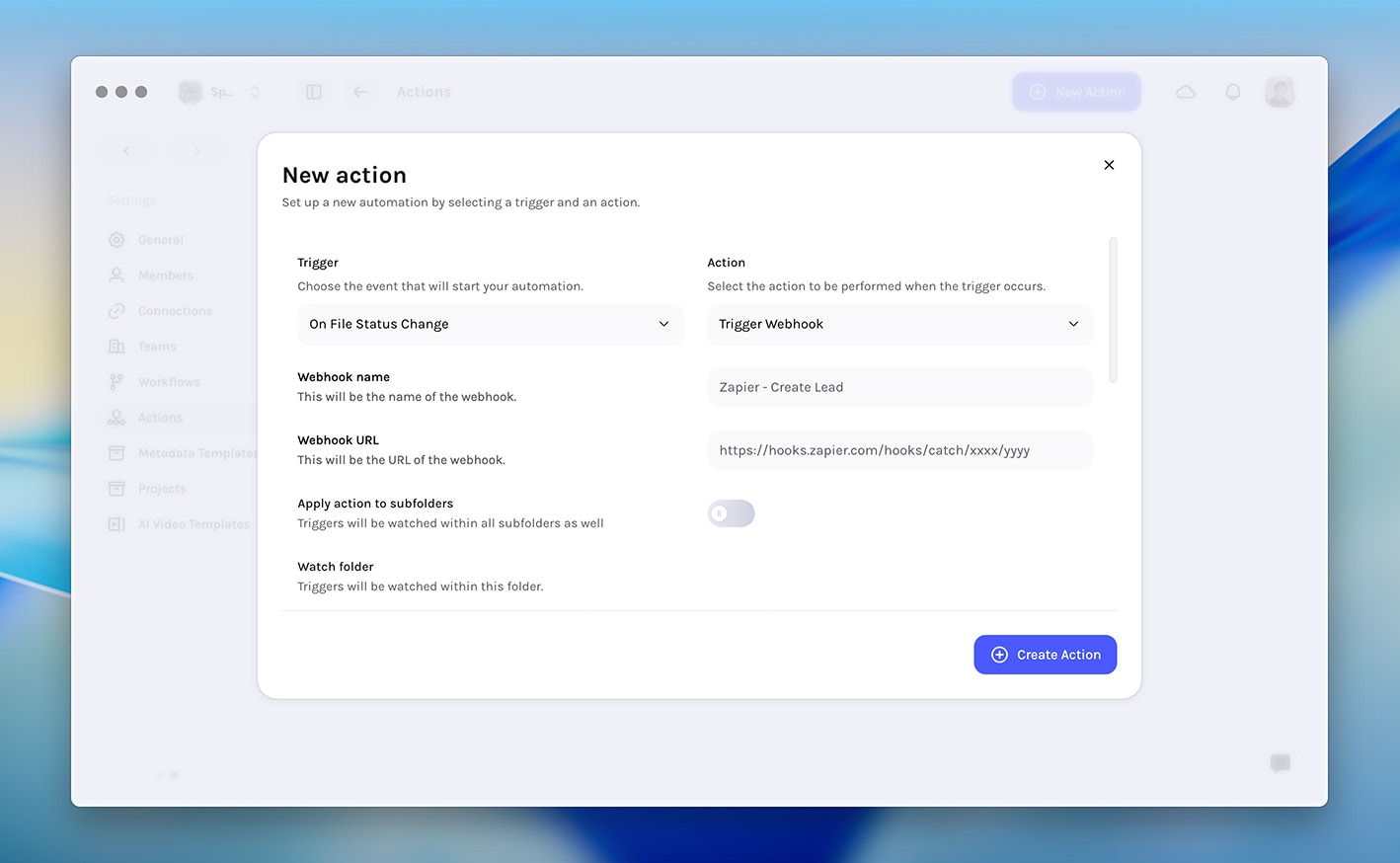 Fill in the webhook **name**, paste the **endpoint URL**, specify the
**watch folder**, define the **payload**, and optionally configure **HTTP
headers** as needed. Then, click **Save** to finish setup.
#### Triggers
* Comment added to file (comment text, user email, video url)
* File status change
* File uploaded to folder
* File viewed
* File downloaded
* File analyzing started
* File analyzing complete
More triggers and actions will become available in upcoming releases.
***
## Enhancements
* Face tracking — New algorithm using our latest face detection model for **improved accuracy**.
* Scene detection export — **Export items as MP4** directly from the AI Detected Metadata tab.
* Unique content ID — Available for every asset in the **Technical metadata** tab.
* Folder deletion — **Optimized performance** for deeply nested structures.
***
## Fixes & Stability
* Relative due date options — Fixed missing options when creating workflow steps.
* Video player buttons and fonts — Unified sizes and standardised font.
* Editor UI — Improved button styling, font consistency, and **increased maximum timeline tracks**.
* Audio files metadata — Fixed empty AI Detected tab for video metadata.
* Toast notifications — Fixed blank messages when multiple toasts were stacked.
* Multi‑audio track analysis — Fixed failures for videos with multiple audio tracks.
* Metadata Autofill API — Fixed multi‑select value parsing.
***
Fill in the webhook **name**, paste the **endpoint URL**, specify the
**watch folder**, define the **payload**, and optionally configure **HTTP
headers** as needed. Then, click **Save** to finish setup.
#### Triggers
* Comment added to file (comment text, user email, video url)
* File status change
* File uploaded to folder
* File viewed
* File downloaded
* File analyzing started
* File analyzing complete
More triggers and actions will become available in upcoming releases.
***
## Enhancements
* Face tracking — New algorithm using our latest face detection model for **improved accuracy**.
* Scene detection export — **Export items as MP4** directly from the AI Detected Metadata tab.
* Unique content ID — Available for every asset in the **Technical metadata** tab.
* Folder deletion — **Optimized performance** for deeply nested structures.
***
## Fixes & Stability
* Relative due date options — Fixed missing options when creating workflow steps.
* Video player buttons and fonts — Unified sizes and standardised font.
* Editor UI — Improved button styling, font consistency, and **increased maximum timeline tracks**.
* Audio files metadata — Fixed empty AI Detected tab for video metadata.
* Toast notifications — Fixed blank messages when multiple toasts were stacked.
* Multi‑audio track analysis — Fixed failures for videos with multiple audio tracks.
* Metadata Autofill API — Fixed multi‑select value parsing.
***