> ## Documentation Index
> Fetch the complete documentation index at: https://docs.tessact.ai/llms.txt
> Use this file to discover all available pages before exploring further.
# Tessact Editor
> The complete guide to assembling, refining, animating, collaborating on, and rendering a video draft.
The Tessact Editor is a frame-accurate workspace for turning a video draft into a finished sequence. It brings media discovery, a layered canvas, a multitrack timeline, property inspectors, keyframe animation, captions, collaboration, and H.264 rendering into one view.
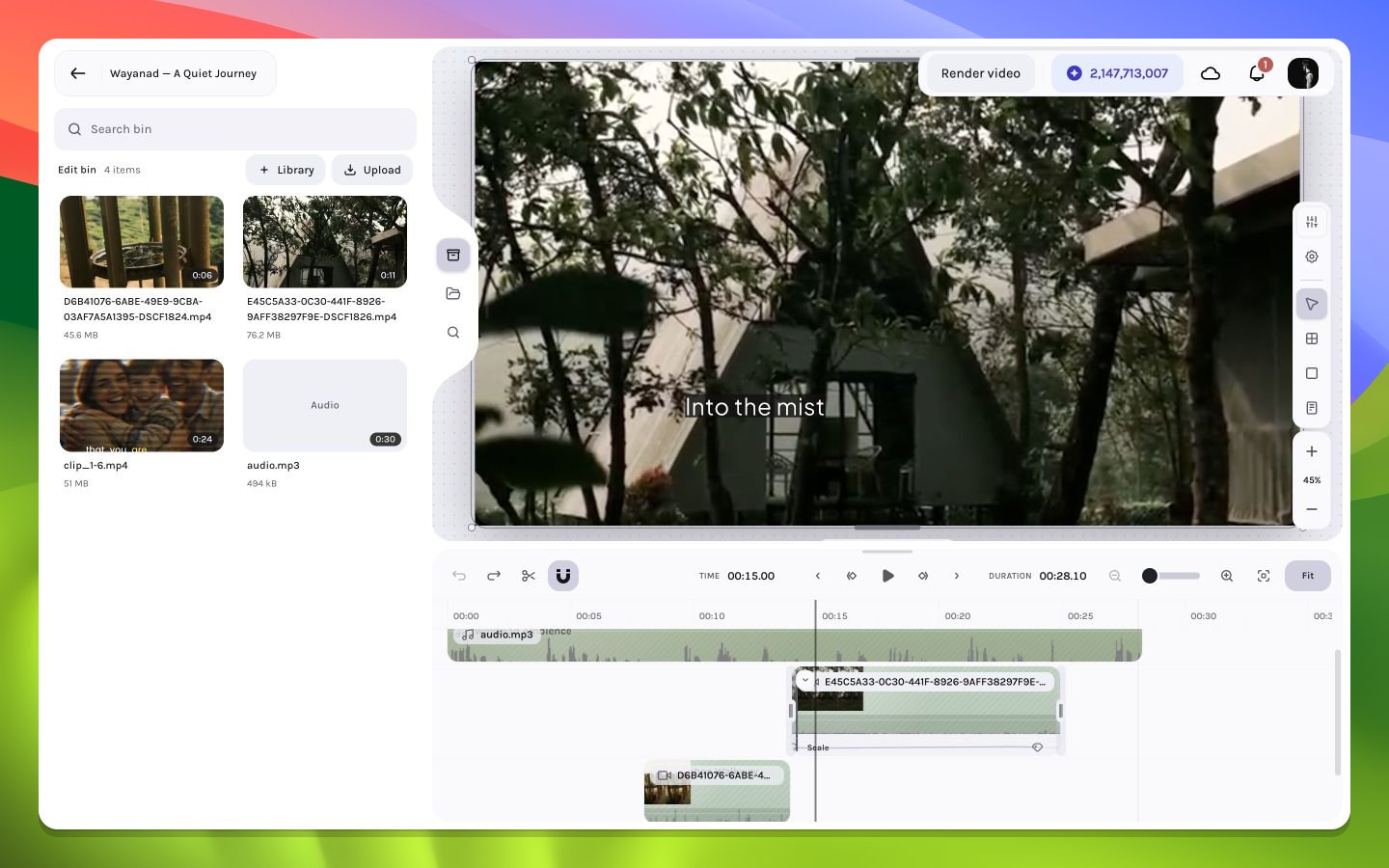 ## Start with the mental model
The editor is easiest to understand as three synchronized views of the same composition:
```mermaid theme={null}
flowchart LR
M["Media panels\nFind source assets"] --> T["Timeline\nPlace and time layers"]
T <--> C["Canvas\nCompose the current frame"]
C <--> I["Inspector\nEdit exact properties"]
P["Playback controls"] --> T
T --> R["H.264 render"]
```
* The **timeline** answers *when* a layer exists.
* The **canvas** answers *where and how* it appears at the current frame.
* The **inspector** exposes exact values and type-specific controls.
* Media panels answer *what source material* is available to add.
* Playback evaluates the whole stack over time; rendering turns that evaluation into a downloadable video.
## Choose a path
Open your video draft, replace a shot, refine timing, add a title, and preview the sequence.
Master selection, trimming, splitting, rolling edits, waveforms, fades, and frame-level navigation.
Position, size, rotate, crop, parent, and lay out layers with precise controls.
Build property tracks, edit values and timing, shape easing, and inspect motion paths.
Create, edit, time, style, and animate readable captions.
Validate the sequence and create an H.264 output while monitoring progress.
## A reliable editing loop
Arrange the primary video and audio layers, then trim for rhythm before adding decoration.
Use the canvas and inspector to establish hierarchy, safe spacing, and consistent alignment.
Introduce titles, captions, solids, shadows, and supporting imagery only where they clarify the story.
Keyframe the smallest useful set of properties, shape the easing, and test at full speed and frame by frame.
Check first and last frames, audio transitions, caption timing, and layer visibility before starting the H.264 render.
Work in passes. Timing changes made late can disturb carefully tuned captions, fades, and keyframes; lock the broad edit before polishing motion.
## Deep reference
For exact control coverage, use the [property matrix](/editor/reference/property-matrix), [context-menu matrix](/editor/reference/context-menus), [media matrix](/editor/reference/media-matrix), [keyboard reference](/editor/reference/shortcuts), and [frame-math guide](/editor/reference/timecode-frame-math).
## Start with the mental model
The editor is easiest to understand as three synchronized views of the same composition:
```mermaid theme={null}
flowchart LR
M["Media panels\nFind source assets"] --> T["Timeline\nPlace and time layers"]
T <--> C["Canvas\nCompose the current frame"]
C <--> I["Inspector\nEdit exact properties"]
P["Playback controls"] --> T
T --> R["H.264 render"]
```
* The **timeline** answers *when* a layer exists.
* The **canvas** answers *where and how* it appears at the current frame.
* The **inspector** exposes exact values and type-specific controls.
* Media panels answer *what source material* is available to add.
* Playback evaluates the whole stack over time; rendering turns that evaluation into a downloadable video.
## Choose a path
Open your video draft, replace a shot, refine timing, add a title, and preview the sequence.
Master selection, trimming, splitting, rolling edits, waveforms, fades, and frame-level navigation.
Position, size, rotate, crop, parent, and lay out layers with precise controls.
Build property tracks, edit values and timing, shape easing, and inspect motion paths.
Create, edit, time, style, and animate readable captions.
Validate the sequence and create an H.264 output while monitoring progress.
## A reliable editing loop
Arrange the primary video and audio layers, then trim for rhythm before adding decoration.
Use the canvas and inspector to establish hierarchy, safe spacing, and consistent alignment.
Introduce titles, captions, solids, shadows, and supporting imagery only where they clarify the story.
Keyframe the smallest useful set of properties, shape the easing, and test at full speed and frame by frame.
Check first and last frames, audio transitions, caption timing, and layer visibility before starting the H.264 render.
Work in passes. Timing changes made late can disturb carefully tuned captions, fades, and keyframes; lock the broad edit before polishing motion.
## Deep reference
For exact control coverage, use the [property matrix](/editor/reference/property-matrix), [context-menu matrix](/editor/reference/context-menus), [media matrix](/editor/reference/media-matrix), [keyboard reference](/editor/reference/shortcuts), and [frame-math guide](/editor/reference/timecode-frame-math).