Sign up, upload your first asset, and run AI-powered actions in minutes.
Before you begin
Before you get started, make sure you have:
An Invitation email — You must receive a Tessact invite from our team before you can sign up.
Request an invite from our team
Your assets — You can upload any media file to Tessact. However for best performance, we recommend H.264/AAC .mp4 under 12 Mb/s. For more information see supported media formats.
The invitation link on the email expires after 24 hours for added security. If
it lapses, use Login with OTP on the login
page instead.
1. Set up your account
When you log in to tessact for the very first time, you will be asked to set up your account.
Sign up from an invitation email
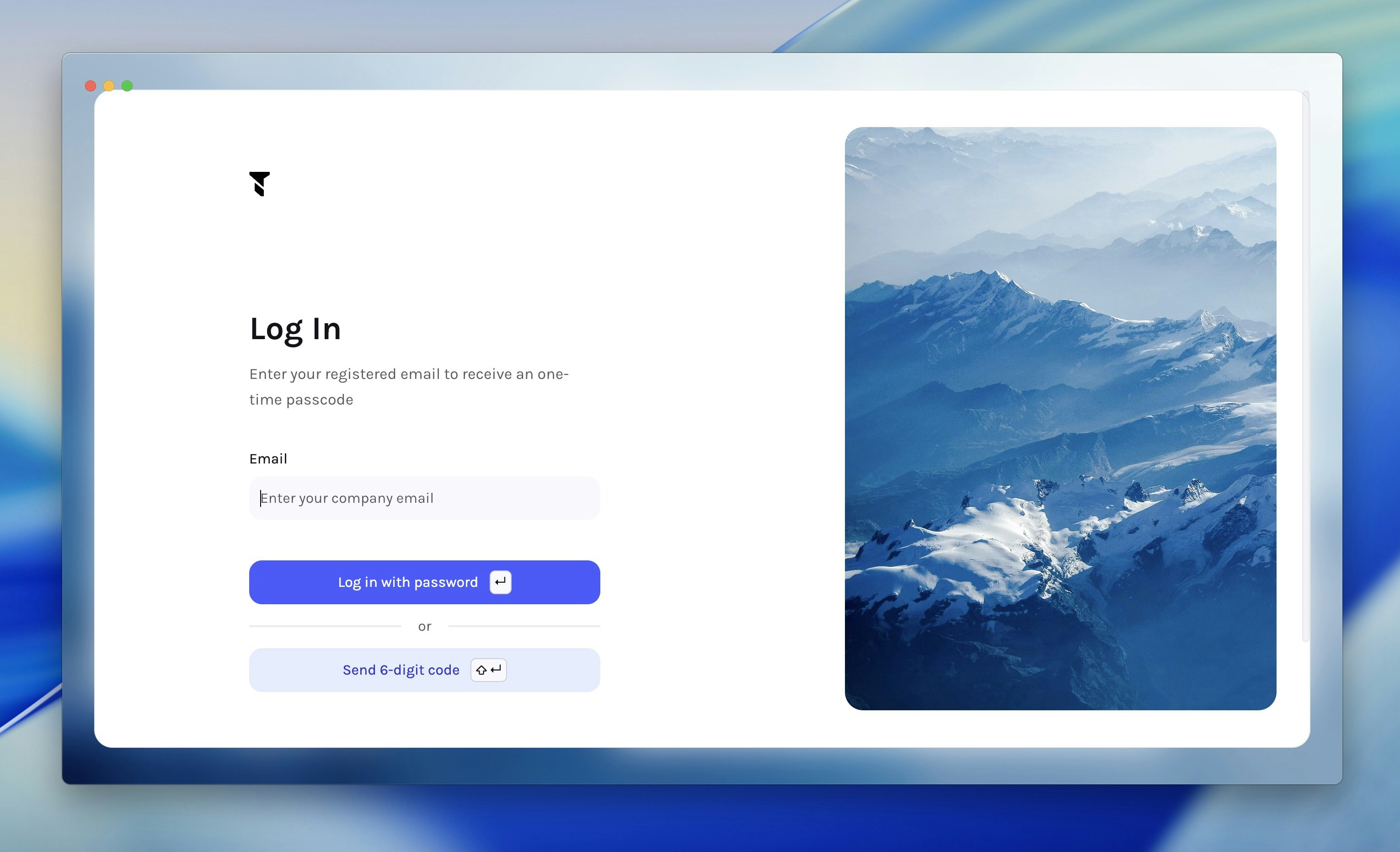
Sign up with a registered email
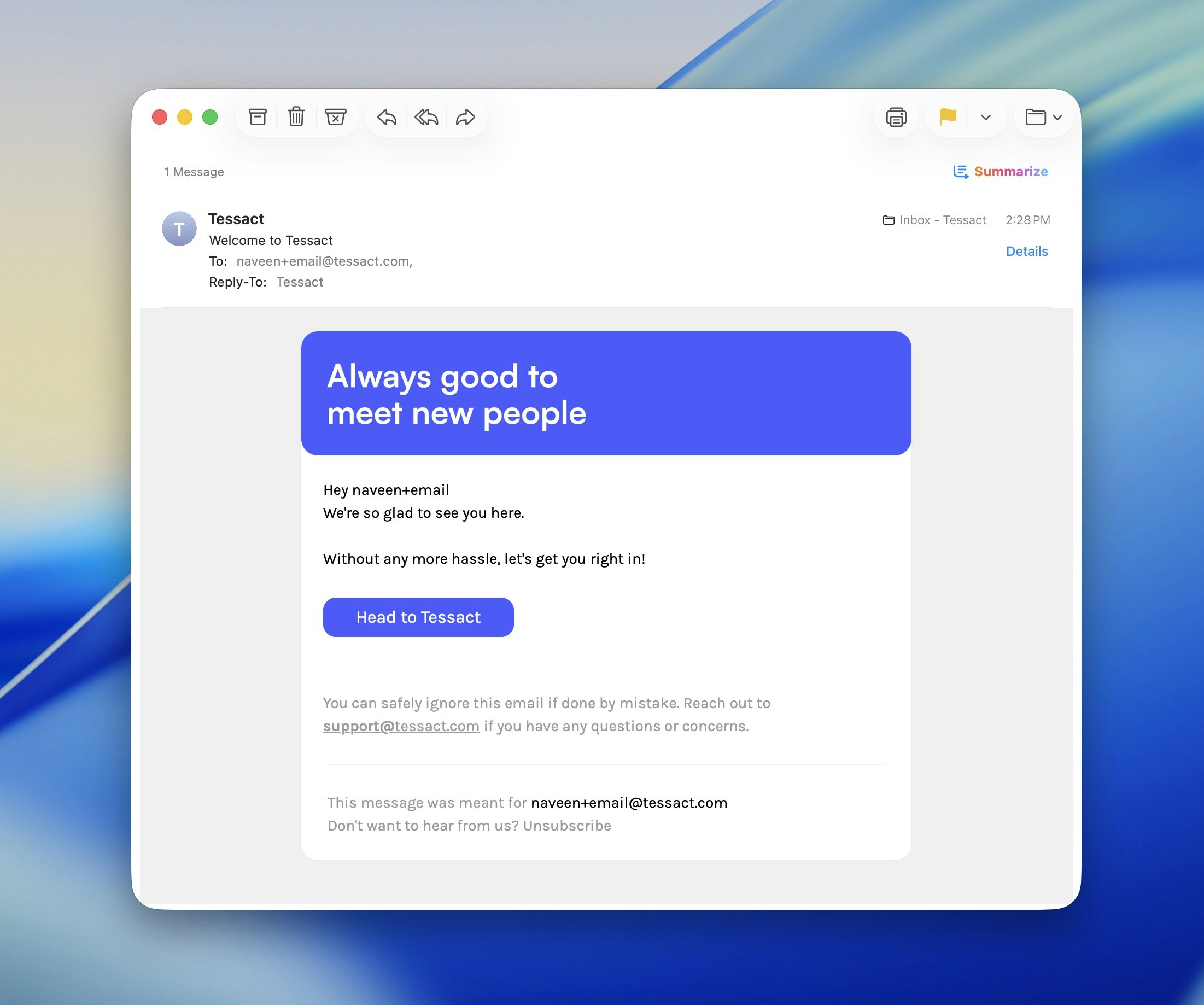
Invitation email with Head to Tessact button
1
Open the invitation email
Click Head to Tessact.If you don’t see the email, check your spam or promotions folder.
2
Complete your profile and set your password
Set up your profile including your name, avatar, organisation, and password, and submit.Password must be at least 8 characters and include a number or symbol.
If your invite is no longer valid, go to https://app.tessact.ai/login → Login with OTP → enter your email → use the one-time code sent to you.
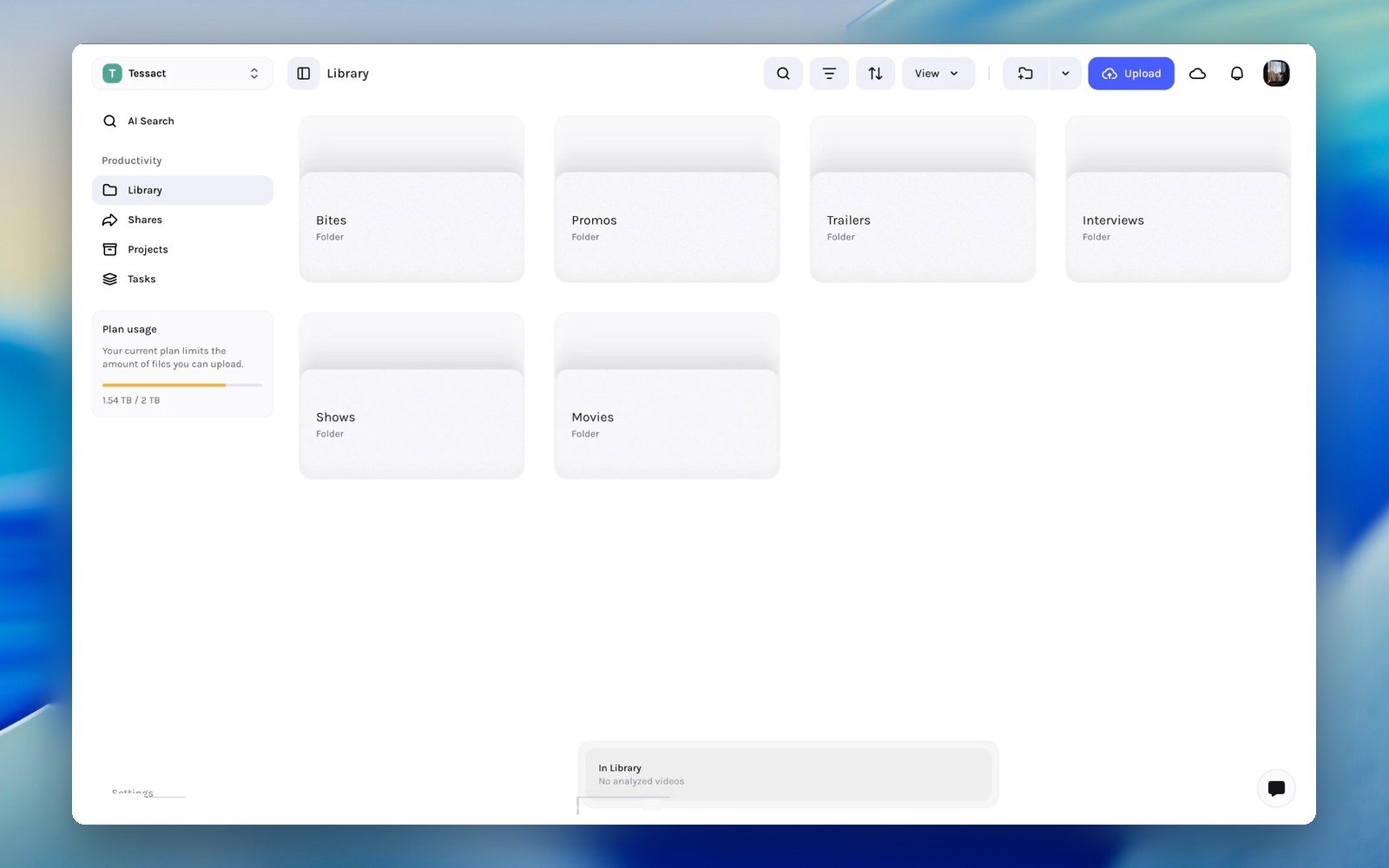
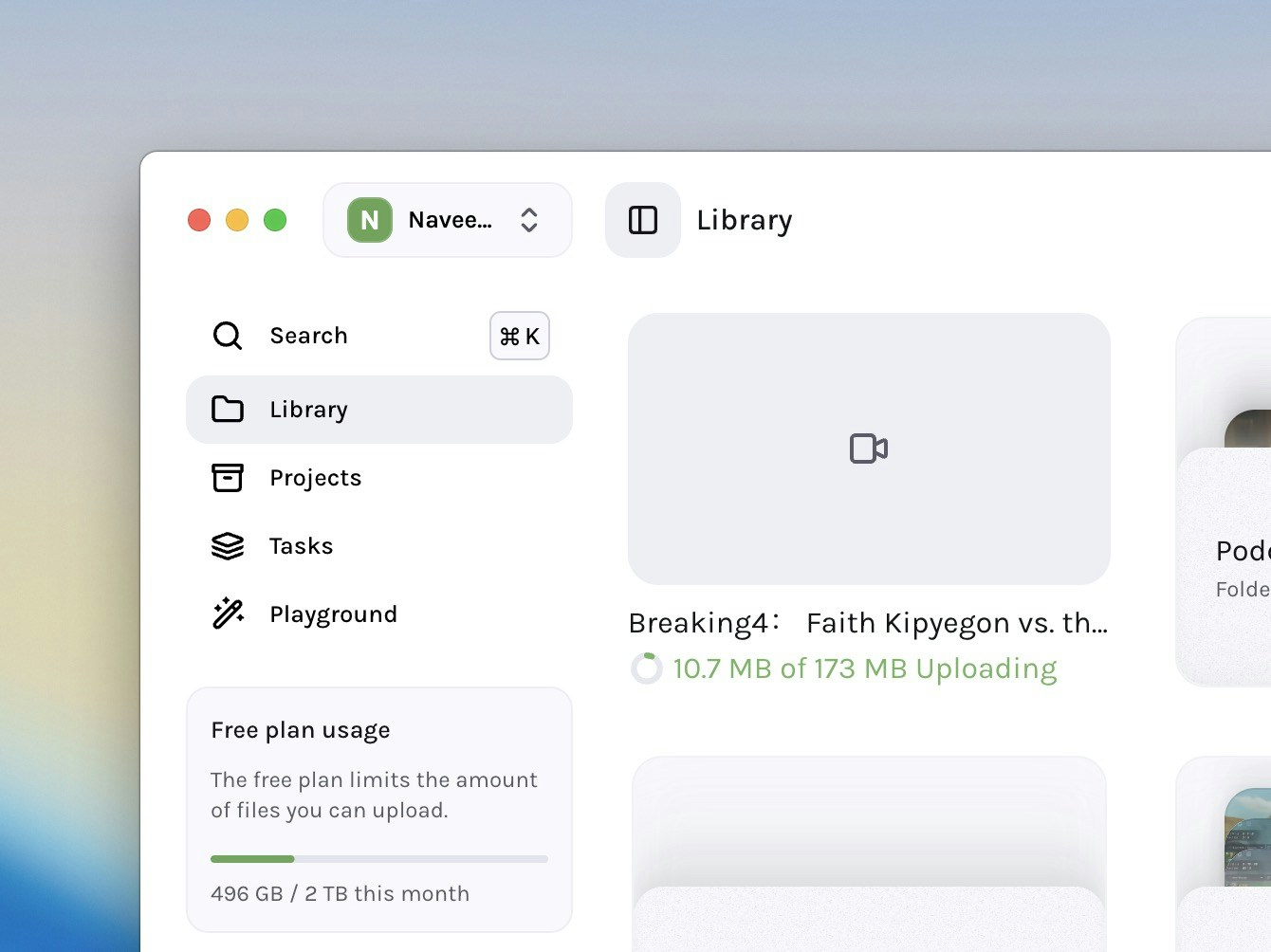
Tessact uploads and queues the file for AI analysis. A progress pill appears on the asset card showing the progress of the analysis.
Average analysis speed is ≈ 15 minutes per hour of H.264/AAC content under
10 Mb/s. Non-preferred codecs or higher bitrates trigger
transcoding and extend processing time.
4. Trigger AI actions
Once your asset is analysed, you can trigger AI actions on it.
You can upload as many files as you want to the Library and trigger AI actions
on them all.
Remix (create social clips)
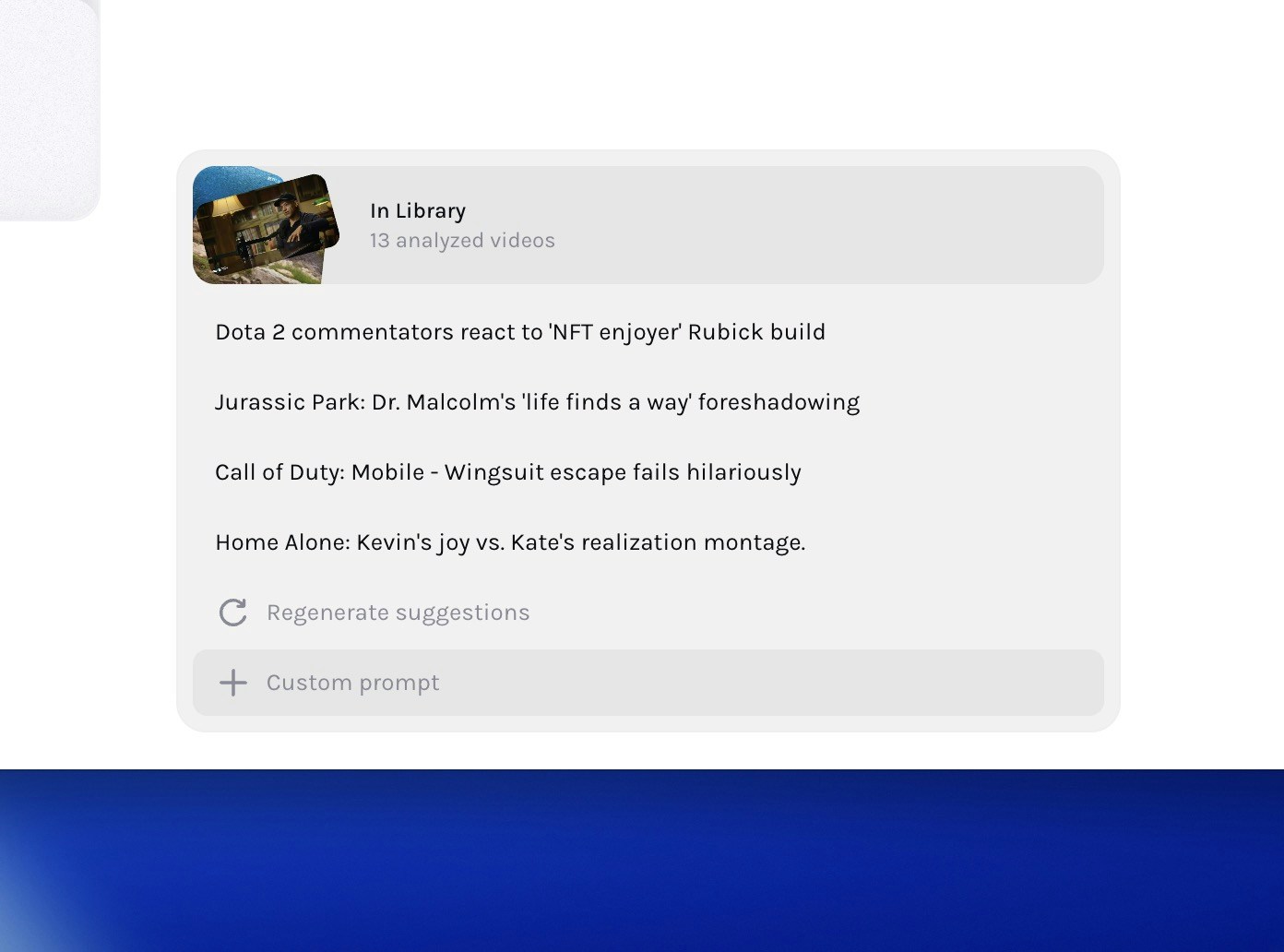
Once analysing is finished, you can see the Remix bar at the bottom of the screen. Hovering on the suggestions will show you more suggestions for clips you can create with AI, or allow you to write your own prompt.
Explore Remixes
Learn more about how Tessact’s Remix AI works.
Prompting Guide
Learn more about how to write prompts for Tessact’s Remix AI.
1
Hover over the remix suggestions on the remix bar
Pick a suggested prompt from the list or write your own (e.g., “Generate a
15-sec teaser”).
Remix bar with suggested and custom prompts
2
Review and download your variants
Tessact generates multiple aspect-ratio variants ready for download or
review.
AI Search for clips
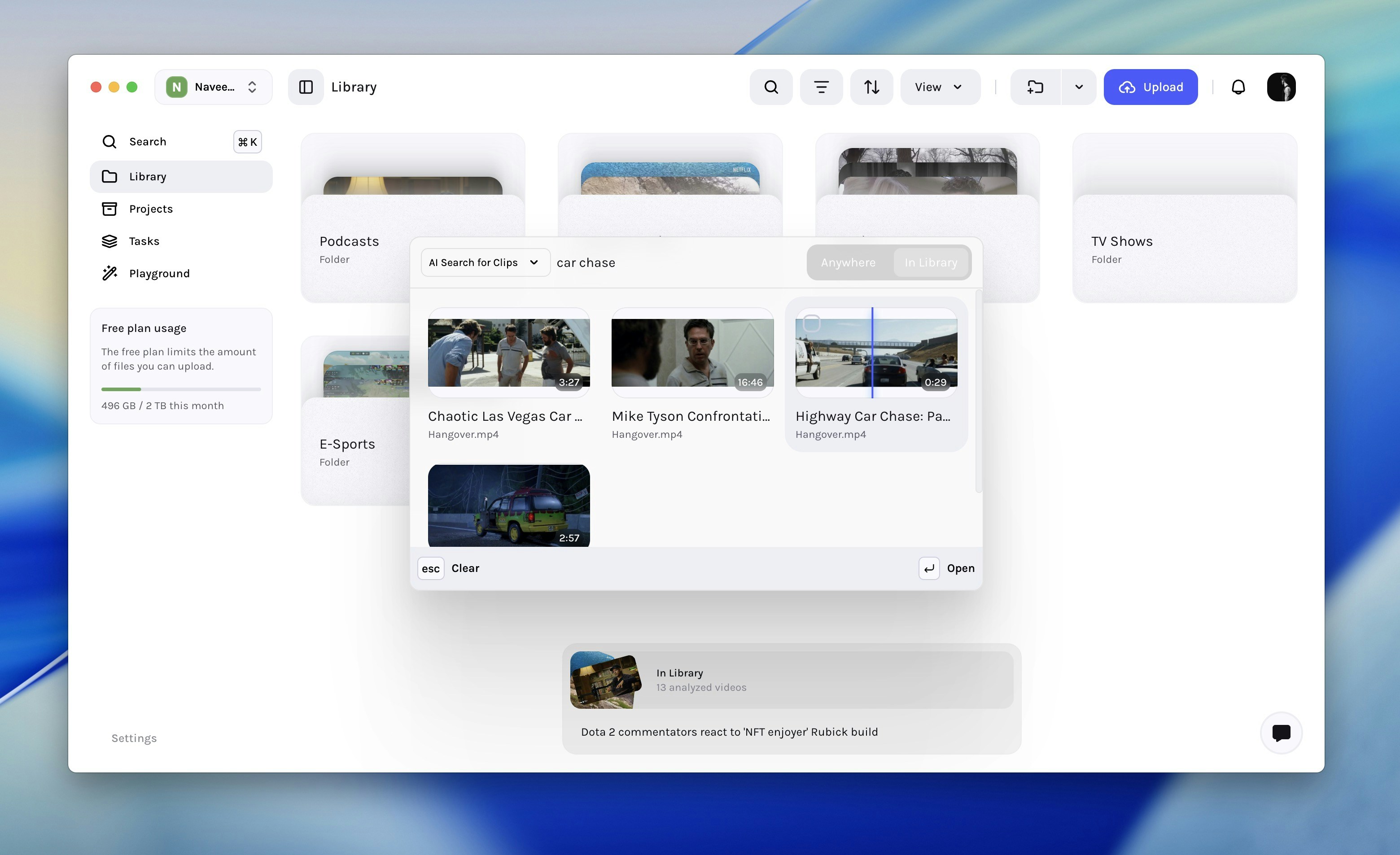
AI search for clips is a powerful way to find the perfect clips for your next project. It works on not just the content in each scene, but also on the contextual understanding of the scene in relation to the overall content.
Explore AI Search
Learn more about how Tessact’s AI search works.
1
Open the AI Search dialog
Press ⌘/Ctrl + K → AI Search for clips or
Click the Search item on top of the left sidebar to open the AI Search
dialog.
2
Type anything you want to find from your content
Tessact finds ideal short clips that match your query that can be used in
your next project.
AI Search dialog showing clip results from your content
AI Autofill metadata
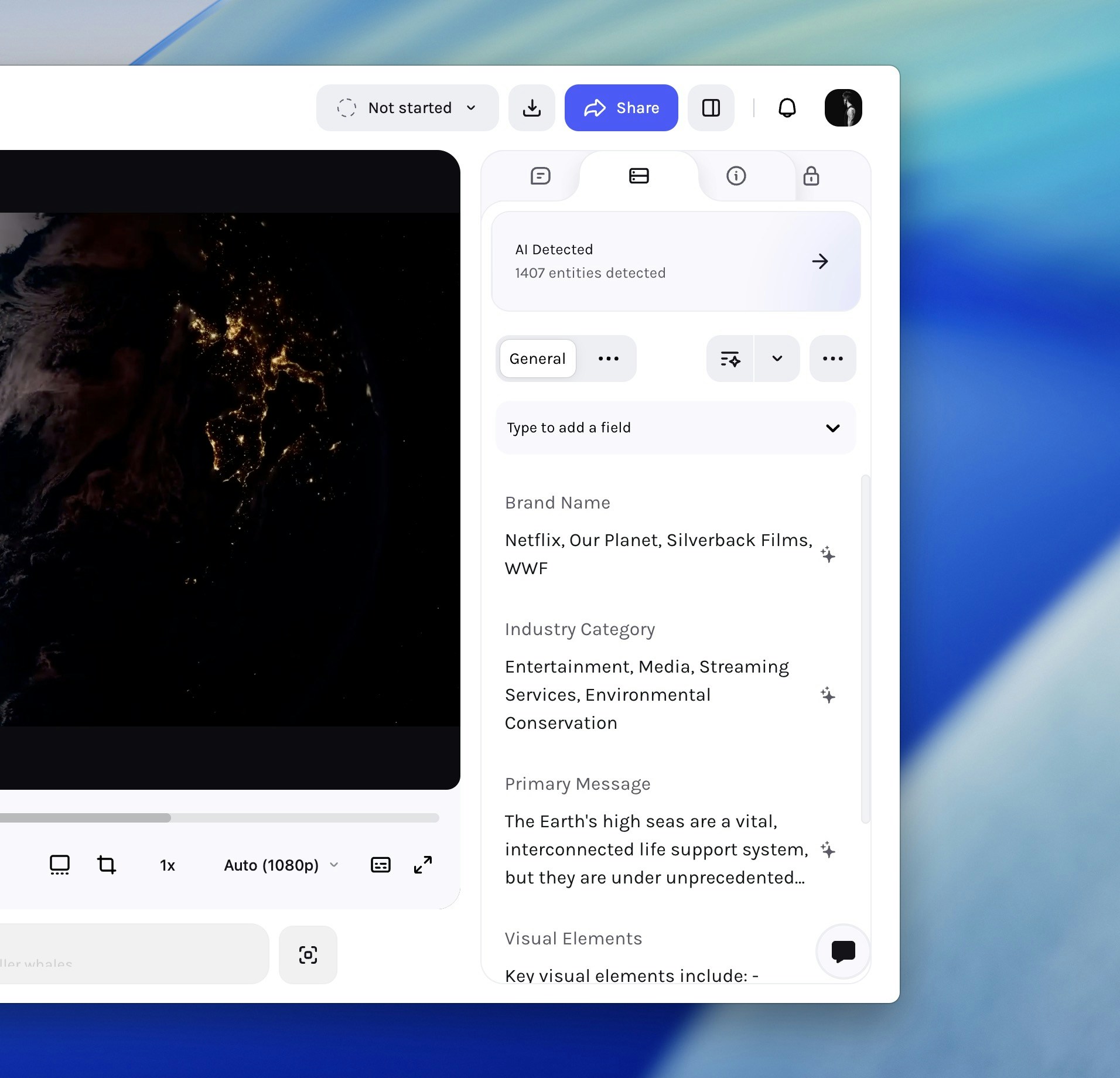
Tessact’s deep understanding of video content allows it to automatically fill in any kind of metadata fields for you. Tessact is especially good at extracting qualitative as well as extremely accurate quantitative metadata (like timeframes, scores, and more) from videos.
Explore AI Autofill
Learn more about how Tessact’s AI Autofill works.
Metadata Management
Learn more about managing metadata in Tessact.
1
Open the asset detail page → Metadata tab.
Clicking on any asset in the library will open the asset detail page. The asset detail page has a Metadata tab on the right panel that allows you to edit the metadata fields associated with the asset.
2
Start from scratch or select a pre-defined template
Click on the Start from scratch button to start from scratch and add your own fields, or select a pre-defined template from the list below.
You can also create a new template in the Settings → Metadata page.
3
Click AI Autofill to populate title, description, and tags.
Edit the automatically filled values by clicking on the field if needed.
Metadata panel with AI Autofilled data
You’ve uploaded your first asset, watched Tessact analyze it, and run AI
actions—all in just a few minutes. Continue by connecting cloud storage or
designing your own multi-agent workflow.
Next steps
Sync an S3 bucket
Follow the S3 Connections setup to connect your cloud storage.
Build multi-agent workflows
Open Workflow Builder and see Creating Workflows to automate your processes.
Invite teammates
Go to Settings → Users for User Management and collaboration.
Deep-dive AI actions
Review AI Agents in Workflows to explore advanced AI capabilities.
⌘I
{"docsConfig":{"theme":"maple","$schema":"https://mintlify.com/docs.json","name":"Tessact Docs","description":"Discover Tessact’s multi-agent media platform, its core value drivers, and the deployment models that let you run workflows and AI agents at any scale.","colors":{"primary":"#495BFF","light":"#5D81FF","dark":"#3137CE"},"logo":{"light":"https://mintcdn.com/tessact/OGApNZ2NxI7GL1qW/logo/light.svg?fit=max\u0026auto=format\u0026n=OGApNZ2NxI7GL1qW\u0026q=85\u0026s=2f031f39661bd8039328b28cc0327b07","dark":"https://mintcdn.com/tessact/OGApNZ2NxI7GL1qW/logo/dark.svg?fit=max\u0026auto=format\u0026n=OGApNZ2NxI7GL1qW\u0026q=85\u0026s=510c60287cbe5165e5b80569d7a0bca4"},"favicon":"https://mintcdn.com/tessact/OGApNZ2NxI7GL1qW/favicon.svg?fit=max\u0026auto=format\u0026n=OGApNZ2NxI7GL1qW\u0026q=85\u0026s=6c2bd2673536c8fb9b413c12354efcf0","navbar":{"links":[{"href":"mailto:naveen@tessact.com","label":"Support"}],"primary":{"type":"button","label":"Tessact Login","href":"https://app.tessact.ai/login"}},"footer":{"socials":{"x":"https://x.com/tessact_ai","linkedin":"https://linkedin.com/company/tessact"}},"fonts":{"heading":{"family":"Karla"},"body":{"family":"Public Sans"}},"contextual":{"options":["chatgpt","claude"],"display":"header"},"styling":{"latex":false},"navigation":{"pages":[]}},"deployment":{"deploymentMetadataValue":{"subdomain":"tessact","hasAudioNarration":false,"actualSubdomain":"tessact","customDomains":["docs.tessact.ai"],"gitSource":{"type":"github","owner":"naveenshaji","repo":"tessact-docs","deployBranch":"main","contentDirectory":"","isPrivate":true,"mountPath":"","label":""},"entitlements":{},"buildId":"6ae92b93ee47552abf466ace:success","clientVersion":"0.0.4271","searchFilterCounts":[{"language":"default","tag":"Editor","count":97},{"language":"default","tag":"Guides","count":35},{"language":"default","tag":"Admin","count":22},{"language":"default","tag":"Timeline","count":11},{"language":"default","tag":"Layers and inspectors","count":10},{"language":"default","tag":"Media","count":9},{"language":"default","tag":"Animation and keyframes","count":8},{"language":"default","tag":"Canvas and layout","count":8},{"language":"default","tag":"Features","count":7},{"language":"default","tag":"Core editing","count":7}]},"assistantConfig":{},"basePath":"","hasChatPermissions":false,"hasWebMcpPermissions":false,"toggles":[{"name":"kill-isr","enabled":true,"variant":{"name":"disabled","enabled":false,"feature_enabled":true},"impressionData":false},{"name":"custom-rbac-roles","enabled":true,"variant":{"name":"disabled","enabled":false,"feature_enabled":true},"impressionData":false},{"name":"agent-mintlify-slack","enabled":true,"variant":{"name":"disabled","enabled":false,"feature_enabled":true},"impressionData":false},{"name":"agent-integrations-settings","enabled":true,"variant":{"name":"disabled","enabled":false,"feature_enabled":true},"impressionData":false},{"name":"rbac-expansion","enabled":true,"variant":{"name":"disabled","enabled":false,"feature_enabled":true},"impressionData":false},{"name":"automations-pr-grouping","enabled":true,"variant":{"name":"disabled","enabled":false,"feature_enabled":true},"impressionData":false},{"name":"custom-prefix","enabled":true,"variant":{"name":"disabled","enabled":false,"feature_enabled":true},"impressionData":false},{"name":"analytics-v7","enabled":true,"variant":{"name":"disabled","enabled":false,"feature_enabled":true},"impressionData":false},{"name":"user-flows-analytics","enabled":true,"variant":{"name":"disabled","enabled":false,"feature_enabled":true},"impressionData":false},{"name":"no-publish-flow","enabled":true,"variant":{"name":"disabled","enabled":false,"feature_enabled":true},"impressionData":false},{"name":"workos-onboarding","enabled":true,"variant":{"name":"disabled","enabled":false,"feature_enabled":true},"impressionData":false},{"name":"snapshot-serving-live","enabled":true,"variant":{"name":"disabled","enabled":false,"feature_enabled":true},"impressionData":false},{"name":"stripTemperatureMiddleware","enabled":true,"variant":{"name":"disabled","enabled":false,"feature_enabled":true},"impressionData":false},{"name":"support-platform-pylon-zendesk","enabled":true,"variant":{"name":"disabled","enabled":false,"feature_enabled":true},"impressionData":false},{"name":"snapshot-serving","enabled":true,"variant":{"name":"disabled","enabled":false,"feature_enabled":true},"impressionData":false},{"name":"instant-rollback","enabled":true,"variant":{"name":"disabled","enabled":false,"feature_enabled":true},"impressionData":false},{"name":"granular-notifications-server","enabled":true,"variant":{"name":"disabled","enabled":false,"feature_enabled":true},"impressionData":false},{"name":"granular-notifications","enabled":true,"variant":{"name":"disabled","enabled":false,"feature_enabled":true},"impressionData":false},{"name":"automations-fable","enabled":true,"variant":{"name":"disabled","enabled":false,"feature_enabled":true},"impressionData":false},{"name":"fixed-ai-action-pricing","enabled":true,"variant":{"name":"disabled","enabled":false,"feature_enabled":true},"impressionData":false},{"name":"site-roles","enabled":true,"variant":{"name":"disabled","enabled":false,"feature_enabled":true},"impressionData":false},{"name":"automation-resolve-merge-conflict","enabled":true,"variant":{"name":"disabled","enabled":false,"feature_enabled":true},"impressionData":false},{"name":"scoped-publishing","enabled":true,"variant":{"name":"disabled","enabled":false,"feature_enabled":true},"impressionData":false},{"name":"mintql","enabled":true,"variant":{"name":"disabled","enabled":false,"feature_enabled":true},"impressionData":false},{"name":"page-level-analytics","enabled":true,"variant":{"name":"disabled","enabled":false,"feature_enabled":true},"impressionData":false},{"name":"editor-version-history-v2","enabled":true,"variant":{"name":"disabled","enabled":false,"feature_enabled":true},"impressionData":false},{"name":"billing-page-v2","enabled":true,"variant":{"name":"disabled","enabled":false,"feature_enabled":true},"impressionData":false},{"name":"full-page-search","enabled":true,"variant":{"name":"disabled","enabled":false,"feature_enabled":true},"impressionData":false},{"name":"workspace-projects","enabled":true,"variant":{"name":"disabled","enabled":false,"feature_enabled":true},"impressionData":false},{"name":"assistant-v5","enabled":true,"variant":{"name":"disabled","enabled":false,"feature_enabled":true},"impressionData":false},{"name":"fork-pr-previews","enabled":true,"variant":{"name":"disabled","enabled":false,"feature_enabled":true},"impressionData":false},{"name":"revalidation-jwt","enabled":true,"variant":{"name":"disabled","enabled":false,"feature_enabled":true},"impressionData":false},{"name":"workos-sso-scim","enabled":true,"variant":{"name":"disabled","enabled":false,"feature_enabled":true},"impressionData":false},{"name":"hobby-abuse-scan","enabled":true,"variant":{"name":"disabled","enabled":false,"feature_enabled":true},"impressionData":false},{"name":"dashboard-inbox","enabled":true,"variant":{"name":"disabled","enabled":false,"feature_enabled":true},"impressionData":false},{"name":"workos-signup","enabled":true,"variant":{"name":"disabled","enabled":false,"feature_enabled":true},"impressionData":false},{"name":"turbopuffer-dual-write","enabled":true,"variant":{"name":"disabled","enabled":false,"feature_enabled":true},"impressionData":false},{"name":"workos-enabled","enabled":true,"variant":{"name":"disabled","enabled":false,"feature_enabled":true},"impressionData":false},{"name":"approve-review-flow","enabled":true,"variant":{"name":"disabled","enabled":false,"feature_enabled":true},"impressionData":false},{"name":"editor-metadata","enabled":true,"variant":{"name":"disabled","enabled":false,"feature_enabled":true},"impressionData":false},{"name":"sso-setup-deadline-banner","enabled":true,"variant":{"name":"disabled","enabled":false,"feature_enabled":true},"impressionData":false},{"name":"turbopuffer-serve","enabled":true,"variant":{"name":"disabled","enabled":false,"feature_enabled":true},"impressionData":false},{"name":"live-agents","enabled":true,"variant":{"name":"disabled","enabled":false,"feature_enabled":true},"impressionData":false},{"name":"starter-pricing","enabled":true,"variant":{"name":"control","enabled":true,"payload":{"type":"string","value":"control"},"feature_enabled":true},"impressionData":false},{"name":"llms-txt-v2","enabled":true,"variant":{"name":"disabled","enabled":false,"feature_enabled":true},"impressionData":false},{"name":"wildcard-email-auth","enabled":true,"variant":{"name":"disabled","enabled":false,"feature_enabled":true},"impressionData":false}],"googleFontsInlined":true},"customCss":[]}
{"page":{"pagePath":"quickstart","slug":"/quickstart","pageMetadata":{"title":"Quick Start","description":"Sign up, upload your first asset, and run AI-powered actions in minutes.","href":"/quickstart"},"description":{"compiledSource":"\"use strict\";\nconst {jsx: _jsx} = arguments[0];\nconst {useMDXComponents: _provideComponents} = arguments[0];\nfunction _createMdxContent(props) {\n const _components = {\n p: \"p\",\n ..._provideComponents(),\n ...props.components\n };\n return _jsx(_components.p, {\n children: \"Sign up, upload your first asset, and run AI-powered actions in minutes.\"\n });\n}\nfunction MDXContent(props = {}) {\n const {wrapper: MDXLayout} = {\n ..._provideComponents(),\n ...props.components\n };\n return MDXLayout ? _jsx(MDXLayout, {\n ...props,\n children: _jsx(_createMdxContent, {\n ...props\n })\n }) : _createMdxContent(props);\n}\nreturn {\n default: MDXContent\n};\n","frontmatter":{},"scope":{}},"pageType":"default","mdx":{"mdxSource":{"compiledSource":"\"use strict\";const{Fragment:_Fragment,jsx:_jsx,jsxs:_jsxs}=arguments[0];const{useMDXComponents:_provideComponents}=arguments[0];function _createMdxContent(props){const _components={a:`a`,code:`code`,em:`em`,hr:`hr`,li:`li`,ol:`ol`,p:`p`,strong:`strong`,ul:`ul`,..._provideComponents(),...props.components},{Card,Check,Columns,Frame,Heading,Info,Note,OptimizedImage,Step,Steps,Tab,Tabs,Tip,Warning}=_components;if(!Card)_missingMdxReference(`Card`,true);if(!Check)_missingMdxReference(`Check`,true);if(!Columns)_missingMdxReference(`Columns`,true);if(!Frame)_missingMdxReference(`Frame`,true);if(!Heading)_missingMdxReference(`Heading`,true);if(!Info)_missingMdxReference(`Info`,true);if(!Note)_missingMdxReference(`Note`,true);if(!OptimizedImage)_missingMdxReference(`OptimizedImage`,true);if(!Step)_missingMdxReference(`Step`,true);if(!Steps)_missingMdxReference(`Steps`,true);if(!Tab)_missingMdxReference(`Tab`,true);if(!Tabs)_missingMdxReference(`Tabs`,true);if(!Tip)_missingMdxReference(`Tip`,true);if(!Warning)_missingMdxReference(`Warning`,true);return _jsxs(_Fragment,{children:[_jsx(Heading,{level:`2`,id:`before-you-begin`,children:`Before you begin`}),`\n`,_jsx(_components.p,{children:`Before you get started, make sure you have:`}),`\n`,_jsxs(_components.ul,{children:[`\n`,_jsxs(_components.li,{children:[_jsx(_components.strong,{children:`An Invitation email`}),` — You must receive a Tessact invite from our team before you can sign up.`,`\n`,_jsx(Card,{arrow:`true`,horizontal:true,href:`https://tessact.ai/contact`,children:_jsx(_components.p,{children:`Request an invite from our team`})}),`\n`,_jsx(`br`,{}),`\n`]}),`\n`,_jsxs(_components.li,{children:[_jsx(_components.strong,{children:`Your assets`}),` — You can upload any media file to Tessact. However for best performance, we recommend H.264/AAC `,_jsx(_components.code,{children:`.mp4`}),` under 12 Mb/s. For more information see `,_jsx(_components.a,{href:`media-formats`,children:`supported media formats`}),`.`]}),`\n`]}),`\n`,_jsx(Warning,{children:_jsxs(_components.p,{children:[`The invitation link on the email expires after 24 hours for added security. If\nit lapses, use Login with OTP on the `,_jsx(_components.a,{href:`https://app.tessact.ai/login`,children:`login`}),`\npage instead.`]})}),`\n`,_jsx(_components.hr,{}),`\n`,_jsx(Heading,{level:`2`,id:`1-set-up-your-account`,children:`1. Set up your account`}),`\n`,_jsxs(_components.p,{children:[`When you `,_jsx(_components.a,{href:`https://app.tessact.ai/login`,children:`log in to tessact`}),` for the very first time, you will be asked to set up your account.`]}),`\n`,_jsxs(Tabs,{children:[_jsxs(Tab,{title:`Sign up from an invitation email`,id:`sign-up-from-an-invitation-email`,children:[_jsx(Frame,{caption:`Invitation email with Head to Tessact button`,children:_jsx(OptimizedImage,{src:`https://mintcdn.com/tessact/OGApNZ2NxI7GL1qW/images/welcome-email.jpg?fit=max\u0026auto=format\u0026n=OGApNZ2NxI7GL1qW\u0026q=85\u0026s=893e570776b07e45420ac3664a0361a6`,alt:`Welcome email screenshot`,\"data-og-width\":`2202`,width:`2202`,\"data-og-height\":`1838`,height:`1838`,\"data-path\":`images/welcome-email.jpg`,\"data-optimize\":`true`,\"data-opv\":`3`,srcset:`https://mintcdn.com/tessact/OGApNZ2NxI7GL1qW/images/welcome-email.jpg?w=280\u0026fit=max\u0026auto=format\u0026n=OGApNZ2NxI7GL1qW\u0026q=85\u0026s=7cc3ead30e0b3bff12629a1f30a857b0 280w, https://mintcdn.com/tessact/OGApNZ2NxI7GL1qW/images/welcome-email.jpg?w=560\u0026fit=max\u0026auto=format\u0026n=OGApNZ2NxI7GL1qW\u0026q=85\u0026s=3d2e343f4a6403afdec0600e947ae61e 560w, https://mintcdn.com/tessact/OGApNZ2NxI7GL1qW/images/welcome-email.jpg?w=840\u0026fit=max\u0026auto=format\u0026n=OGApNZ2NxI7GL1qW\u0026q=85\u0026s=d4dcafefb254d2d5acaedd1ae3237c45 840w, https://mintcdn.com/tessact/OGApNZ2NxI7GL1qW/images/welcome-email.jpg?w=1100\u0026fit=max\u0026auto=format\u0026n=OGApNZ2NxI7GL1qW\u0026q=85\u0026s=de33ce56e281c0620e27c015b708567e 1100w, https://mintcdn.com/tessact/OGApNZ2NxI7GL1qW/images/welcome-email.jpg?w=1650\u0026fit=max\u0026auto=format\u0026n=OGApNZ2NxI7GL1qW\u0026q=85\u0026s=a69dd1c7ce8dfa54d068aeb2ad3addb7 1650w, https://mintcdn.com/tessact/OGApNZ2NxI7GL1qW/images/welcome-email.jpg?w=2500\u0026fit=max\u0026auto=format\u0026n=OGApNZ2NxI7GL1qW\u0026q=85\u0026s=643cf0dd623ae3811705c1c381c44ed6 2500w`})}),_jsxs(Steps,{children:[_jsxs(Step,{title:`Open the invitation email`,children:[_jsxs(_components.p,{children:[`Click `,_jsx(_components.strong,{children:`Head to Tessact`}),`.`]}),_jsx(_components.p,{children:_jsx(_components.em,{children:`If you don’t see the email, check your spam or promotions folder.`})})]}),_jsxs(Step,{title:`Complete your profile and set your password`,children:[_jsx(_components.p,{children:`Set up your profile including your name, avatar, organisation, and password, and submit.`}),_jsx(_components.p,{children:_jsx(_components.em,{children:`Password must be at least 8 characters and include a number or symbol.`})})]})]}),_jsx(Info,{children:_jsxs(_components.p,{children:[`If your invite is no longer valid, go to `,_jsx(_components.a,{href:`https://app.tessact.ai/login`,children:`https://app.tessact.ai/login`}),` → `,_jsx(_components.strong,{children:`Login with OTP`}),` → enter your email → use the one-time code sent to you.`]})})]}),_jsxs(Tab,{title:`Sign up with a registered email`,id:`sign-up-with-a-registered-email`,children:[_jsxs(_components.ol,{children:[`\n`,_jsxs(_components.li,{children:[`Navigate to `,_jsx(_components.a,{href:`https://app.tessact.ai/login`,children:_jsx(_components.strong,{children:`https://app.tessact.ai/login`})}),`.`]}),`\n`]}),_jsx(Frame,{caption:`Login page with Password and OTP options`,children:_jsx(OptimizedImage,{src:`https://mintcdn.com/tessact/OGApNZ2NxI7GL1qW/images/login.jpg?fit=max\u0026auto=format\u0026n=OGApNZ2NxI7GL1qW\u0026q=85\u0026s=e5d1a7ae57b6ebc69977aa32aa9a5730`,alt:`Login page screenshot`,\"data-og-width\":`3062`,width:`3062`,\"data-og-height\":`1864`,height:`1864`,\"data-path\":`images/login.jpg`,\"data-optimize\":`true`,\"data-opv\":`3`,srcset:`https://mintcdn.com/tessact/OGApNZ2NxI7GL1qW/images/login.jpg?w=280\u0026fit=max\u0026auto=format\u0026n=OGApNZ2NxI7GL1qW\u0026q=85\u0026s=d5bf29e3850d471ad018c376d6243fb7 280w, https://mintcdn.com/tessact/OGApNZ2NxI7GL1qW/images/login.jpg?w=560\u0026fit=max\u0026auto=format\u0026n=OGApNZ2NxI7GL1qW\u0026q=85\u0026s=9547163afa38cfb9d308d05c1b797b06 560w, https://mintcdn.com/tessact/OGApNZ2NxI7GL1qW/images/login.jpg?w=840\u0026fit=max\u0026auto=format\u0026n=OGApNZ2NxI7GL1qW\u0026q=85\u0026s=3d6da2fb1c572a0a27428f828a5609a2 840w, https://mintcdn.com/tessact/OGApNZ2NxI7GL1qW/images/login.jpg?w=1100\u0026fit=max\u0026auto=format\u0026n=OGApNZ2NxI7GL1qW\u0026q=85\u0026s=7547e0ac3441b13cec0109629e51416b 1100w, https://mintcdn.com/tessact/OGApNZ2NxI7GL1qW/images/login.jpg?w=1650\u0026fit=max\u0026auto=format\u0026n=OGApNZ2NxI7GL1qW\u0026q=85\u0026s=1cd48700d74229269e66b8de55502d53 1650w, https://mintcdn.com/tessact/OGApNZ2NxI7GL1qW/images/login.jpg?w=2500\u0026fit=max\u0026auto=format\u0026n=OGApNZ2NxI7GL1qW\u0026q=85\u0026s=2e12fd8ebdab388f3e125bf93fbe5650 2500w`})}),_jsxs(_components.ol,{start:`2`,children:[`\n`,_jsxs(_components.li,{children:[`Sign in with your password `,_jsx(_components.em,{children:`or`}),` choose `,_jsx(_components.strong,{children:`Send 6-digit code`}),` if you prefer one-time codes.`]}),`\n`]}),_jsx(Check,{children:_jsxs(_components.p,{children:[`Successful login redirects you to the `,_jsx(_components.strong,{children:`Library`}),` containing sample assets.`]})}),_jsx(_components.p,{children:`You can still set up your profile including your name, avatar, organisation, and password by navigating to Profile icon → Preferences → Profile.`})]})]}),`\n`,_jsx(_components.hr,{}),`\n`,_jsx(Heading,{level:`2`,id:`2-explore-the-library`,children:`2. Explore the Library`}),`\n`,_jsx(Frame,{caption:`Library with the Upload button and your folder structure`,children:_jsx(OptimizedImage,{src:`https://mintcdn.com/tessact/JU7kxTUKHTCw8NAS/images/library-live-v2.jpg?fit=max\u0026auto=format\u0026n=JU7kxTUKHTCw8NAS\u0026q=85\u0026s=c4b576667b14794f638389800a431fa5`,alt:`Library screenshot`,\"data-og-width\":`1600`,width:`1600`,\"data-og-height\":`1000`,height:`1000`,\"data-path\":`images/library-live-v2.jpg`,\"data-optimize\":`true`,\"data-opv\":`3`,srcset:`https://mintcdn.com/tessact/JU7kxTUKHTCw8NAS/images/library-live-v2.jpg?w=280\u0026fit=max\u0026auto=format\u0026n=JU7kxTUKHTCw8NAS\u0026q=85\u0026s=2e76c36f6641c0d3adc643c5f62ebeda 280w, https://mintcdn.com/tessact/JU7kxTUKHTCw8NAS/images/library-live-v2.jpg?w=560\u0026fit=max\u0026auto=format\u0026n=JU7kxTUKHTCw8NAS\u0026q=85\u0026s=090f5beda81894da38cf5a42ba33fd4b 560w, https://mintcdn.com/tessact/JU7kxTUKHTCw8NAS/images/library-live-v2.jpg?w=840\u0026fit=max\u0026auto=format\u0026n=JU7kxTUKHTCw8NAS\u0026q=85\u0026s=c0301bad5ff308ab0af9734c86cebe66 840w, https://mintcdn.com/tessact/JU7kxTUKHTCw8NAS/images/library-live-v2.jpg?w=1100\u0026fit=max\u0026auto=format\u0026n=JU7kxTUKHTCw8NAS\u0026q=85\u0026s=5a421143421f72c4973735d928b2fae7 1100w, https://mintcdn.com/tessact/JU7kxTUKHTCw8NAS/images/library-live-v2.jpg?w=1650\u0026fit=max\u0026auto=format\u0026n=JU7kxTUKHTCw8NAS\u0026q=85\u0026s=d3d77fc8a4cf11d9948c2c4ab36231da 1650w, https://mintcdn.com/tessact/JU7kxTUKHTCw8NAS/images/library-live-v2.jpg?w=2500\u0026fit=max\u0026auto=format\u0026n=JU7kxTUKHTCw8NAS\u0026q=85\u0026s=1649e553c672adec9e6502842219a392 2500w`})}),`\n`,_jsxs(_components.ul,{children:[`\n`,_jsxs(_components.li,{children:[`Notice the `,_jsx(_components.strong,{children:`Upload`}),` button and drag-and-drop zone.`]}),`\n`,_jsx(_components.li,{children:`AI status badges display ingest, transcode, and analysis progress for each asset.`}),`\n`]}),`\n`,_jsxs(Info,{children:[`Delete any sample assets if you don’t need them via `,_jsx(_components.strong,{children:`⋯ → Delete`}),`.`]}),`\n`,_jsx(_components.hr,{}),`\n`,_jsx(Heading,{level:`2`,id:`3-upload-your-first-asset`,children:`3. Upload your first asset`}),`\n`,_jsxs(Steps,{children:[_jsxs(Step,{title:`Select files`,children:[_jsxs(_components.p,{children:[`Click `,_jsx(_components.strong,{children:`Upload`}),` on the top right of the screen or drag your media into the Library.`]}),_jsx(Tip,{children:_jsxs(_components.p,{children:[`For the fastest turnaround, follow the `,_jsx(_components.a,{href:`/media-formats`,children:`supported media formats`}),` guide.`]})}),_jsx(Frame,{caption:`Asset card showing upload progress`,children:_jsx(OptimizedImage,{src:`https://mintcdn.com/tessact/OGApNZ2NxI7GL1qW/images/uploading.jpg?fit=max\u0026auto=format\u0026n=OGApNZ2NxI7GL1qW\u0026q=85\u0026s=507420c17add858ba8444156e76550bb`,alt:`Asset upload progress`,\"data-og-width\":`1340`,width:`1340`,\"data-og-height\":`1004`,height:`1004`,\"data-path\":`images/uploading.jpg`,\"data-optimize\":`true`,\"data-opv\":`3`,srcset:`https://mintcdn.com/tessact/OGApNZ2NxI7GL1qW/images/uploading.jpg?w=280\u0026fit=max\u0026auto=format\u0026n=OGApNZ2NxI7GL1qW\u0026q=85\u0026s=697ced83887b0c959e7be5faffd9cca2 280w, https://mintcdn.com/tessact/OGApNZ2NxI7GL1qW/images/uploading.jpg?w=560\u0026fit=max\u0026auto=format\u0026n=OGApNZ2NxI7GL1qW\u0026q=85\u0026s=a727c85101c7947050398978f8983af2 560w, https://mintcdn.com/tessact/OGApNZ2NxI7GL1qW/images/uploading.jpg?w=840\u0026fit=max\u0026auto=format\u0026n=OGApNZ2NxI7GL1qW\u0026q=85\u0026s=a150e4bcf544edaa61563bc2e480da65 840w, https://mintcdn.com/tessact/OGApNZ2NxI7GL1qW/images/uploading.jpg?w=1100\u0026fit=max\u0026auto=format\u0026n=OGApNZ2NxI7GL1qW\u0026q=85\u0026s=33ad5dafc1d52f7ccf06a24a09827042 1100w, https://mintcdn.com/tessact/OGApNZ2NxI7GL1qW/images/uploading.jpg?w=1650\u0026fit=max\u0026auto=format\u0026n=OGApNZ2NxI7GL1qW\u0026q=85\u0026s=748a9a0d3725e94f5e8c0fb82eaa598e 1650w, https://mintcdn.com/tessact/OGApNZ2NxI7GL1qW/images/uploading.jpg?w=2500\u0026fit=max\u0026auto=format\u0026n=OGApNZ2NxI7GL1qW\u0026q=85\u0026s=0e7ebccf81490398b2bc33ac3dc8c4e0 2500w`})})]}),_jsxs(Step,{title:`Wait for analysing to finish`,children:[_jsx(_components.p,{children:`Tessact uploads and queues the file for AI analysis. A progress pill appears on the asset card showing the progress of the analysis.`}),_jsx(Note,{children:_jsxs(_components.p,{children:[`Average analysis speed is `,_jsx(_components.strong,{children:`≈ 15 minutes per hour of H.264/AAC content under\n10 Mb/s`}),`. `,_jsx(_components.a,{href:`/media-formats`,children:`Non-preferred codecs`}),` or higher bitrates trigger\ntranscoding and extend processing time.`]})})]})]}),`\n`,_jsx(_components.hr,{}),`\n`,_jsx(Heading,{level:`2`,id:`4-trigger-ai-actions`,children:`4. Trigger AI actions`}),`\n`,_jsx(_components.p,{children:`Once your asset is analysed, you can trigger AI actions on it.`}),`\n`,_jsx(Tip,{children:_jsx(_components.p,{children:`You can upload as many files as you want to the Library and trigger AI actions\non them all.`})}),`\n`,_jsx(Heading,{level:`3`,id:`remix-create-social-clips`,children:`Remix (create social clips)`}),`\n`,_jsx(_components.p,{children:`Once analysing is finished, you can see the Remix bar at the bottom of the screen. Hovering on the suggestions will show you more suggestions for clips you can create with AI, or allow you to write your own prompt.`}),`\n`,_jsxs(Columns,{cols:2,children:[_jsx(Card,{title:`Explore Remixes`,arrow:`true`,horizontal:true,href:`/index`,children:_jsx(_components.p,{children:`Learn more about how Tessact’s Remix AI works.`})}),_jsx(Card,{title:`Prompting Guide`,arrow:`true`,horizontal:true,href:`/index`,children:_jsx(_components.p,{children:`Learn more about how to write prompts for Tessact’s Remix AI.`})})]}),`\n`,_jsxs(Steps,{children:[_jsxs(Step,{title:`Hover over the remix suggestions on the remix bar`,children:[_jsx(_components.p,{children:`Pick a suggested prompt from the list or write your own (e.g., “Generate a\n15-sec teaser”).`}),_jsx(Frame,{caption:`Remix bar with suggested and custom prompts`,children:_jsx(OptimizedImage,{src:`https://mintcdn.com/tessact/OGApNZ2NxI7GL1qW/images/remix.jpg?fit=max\u0026auto=format\u0026n=OGApNZ2NxI7GL1qW\u0026q=85\u0026s=c6a8303dbf8491a48c6a08a559bc427f`,alt:`Remix bar screenshot`,\"data-og-width\":`1392`,width:`1392`,\"data-og-height\":`1032`,height:`1032`,\"data-path\":`images/remix.jpg`,\"data-optimize\":`true`,\"data-opv\":`3`,srcset:`https://mintcdn.com/tessact/OGApNZ2NxI7GL1qW/images/remix.jpg?w=280\u0026fit=max\u0026auto=format\u0026n=OGApNZ2NxI7GL1qW\u0026q=85\u0026s=224d00f81e21c1cda6bbd441ecc1313d 280w, https://mintcdn.com/tessact/OGApNZ2NxI7GL1qW/images/remix.jpg?w=560\u0026fit=max\u0026auto=format\u0026n=OGApNZ2NxI7GL1qW\u0026q=85\u0026s=742baf84d15b4927e1a7d7da7432835e 560w, https://mintcdn.com/tessact/OGApNZ2NxI7GL1qW/images/remix.jpg?w=840\u0026fit=max\u0026auto=format\u0026n=OGApNZ2NxI7GL1qW\u0026q=85\u0026s=64959e3f03956c365f4e72b448f237cd 840w, https://mintcdn.com/tessact/OGApNZ2NxI7GL1qW/images/remix.jpg?w=1100\u0026fit=max\u0026auto=format\u0026n=OGApNZ2NxI7GL1qW\u0026q=85\u0026s=835b5f39fc84f2b163ec60e27862118c 1100w, https://mintcdn.com/tessact/OGApNZ2NxI7GL1qW/images/remix.jpg?w=1650\u0026fit=max\u0026auto=format\u0026n=OGApNZ2NxI7GL1qW\u0026q=85\u0026s=ca962bad75e7349faca95a0be3da2116 1650w, https://mintcdn.com/tessact/OGApNZ2NxI7GL1qW/images/remix.jpg?w=2500\u0026fit=max\u0026auto=format\u0026n=OGApNZ2NxI7GL1qW\u0026q=85\u0026s=395e4b9dbb393f07855b1ab35afe3b4b 2500w`})})]}),_jsx(Step,{title:`Review and download your variants`,children:_jsx(_components.p,{children:`Tessact generates multiple aspect-ratio variants ready for download or\nreview.`})})]}),`\n`,_jsx(Heading,{level:`3`,id:`ai-search-for-clips`,children:`AI Search for clips`}),`\n`,_jsx(_components.p,{children:`AI search for clips is a powerful way to find the perfect clips for your next project. It works on not just the content in each scene, but also on the contextual understanding of the scene in relation to the overall content.`}),`\n`,_jsx(Card,{title:`Explore AI Search`,arrow:`true`,horizontal:true,href:`/ai-search`,children:_jsx(_components.p,{children:`Learn more about how Tessact’s AI search works.`})}),`\n`,_jsxs(Steps,{children:[_jsx(Step,{title:`Open the AI Search dialog`,children:_jsxs(_components.p,{children:[`Press `,_jsx(`kbd`,{children:`⌘/Ctrl + K`}),` → AI Search for clips `,_jsx(`br`,{}),`\n`,_jsx(_components.em,{children:`or`}),` `,_jsx(`br`,{}),`\nClick the Search item on top of the left sidebar to open the AI Search\ndialog.`]})}),_jsxs(Step,{title:`Type anything you want to find from your content`,children:[_jsx(_components.p,{children:`Tessact finds ideal short clips that match your query that can be used in\nyour next project.`}),_jsx(Frame,{caption:`AI Search dialog showing clip results from your content`,children:_jsx(OptimizedImage,{src:`https://mintcdn.com/tessact/OGApNZ2NxI7GL1qW/images/ai-search-results.jpg?fit=max\u0026auto=format\u0026n=OGApNZ2NxI7GL1qW\u0026q=85\u0026s=766d52038ff1796e7bba7a7b4c62f65c`,alt:`AI search results`,\"data-og-width\":`3120`,width:`3120`,\"data-og-height\":`1906`,height:`1906`,\"data-path\":`images/ai-search-results.jpg`,\"data-optimize\":`true`,\"data-opv\":`3`,srcset:`https://mintcdn.com/tessact/OGApNZ2NxI7GL1qW/images/ai-search-results.jpg?w=280\u0026fit=max\u0026auto=format\u0026n=OGApNZ2NxI7GL1qW\u0026q=85\u0026s=0b60afac9aa11a09e94c3783bd49870b 280w, https://mintcdn.com/tessact/OGApNZ2NxI7GL1qW/images/ai-search-results.jpg?w=560\u0026fit=max\u0026auto=format\u0026n=OGApNZ2NxI7GL1qW\u0026q=85\u0026s=9cfac76c3767026d6e0fe5b398079795 560w, https://mintcdn.com/tessact/OGApNZ2NxI7GL1qW/images/ai-search-results.jpg?w=840\u0026fit=max\u0026auto=format\u0026n=OGApNZ2NxI7GL1qW\u0026q=85\u0026s=a3f9290a72cdb0d8660376c8a4b84a15 840w, https://mintcdn.com/tessact/OGApNZ2NxI7GL1qW/images/ai-search-results.jpg?w=1100\u0026fit=max\u0026auto=format\u0026n=OGApNZ2NxI7GL1qW\u0026q=85\u0026s=77ba291e9c011b4f2e5cf635671b7c8d 1100w, https://mintcdn.com/tessact/OGApNZ2NxI7GL1qW/images/ai-search-results.jpg?w=1650\u0026fit=max\u0026auto=format\u0026n=OGApNZ2NxI7GL1qW\u0026q=85\u0026s=5fa8f07c534f7bb6eb80de986fe9d6ca 1650w, https://mintcdn.com/tessact/OGApNZ2NxI7GL1qW/images/ai-search-results.jpg?w=2500\u0026fit=max\u0026auto=format\u0026n=OGApNZ2NxI7GL1qW\u0026q=85\u0026s=6ecfb26eb052b0ba0e4f739ab13ada84 2500w`})})]})]}),`\n`,_jsx(Heading,{level:`3`,id:`ai-autofill-metadata`,children:`AI Autofill metadata`}),`\n`,_jsx(_components.p,{children:`Tessact’s deep understanding of video content allows it to automatically fill in any kind of metadata fields for you. Tessact is especially good at extracting qualitative as well as extremely accurate quantitative metadata (like timeframes, scores, and more) from videos.`}),`\n`,_jsxs(Columns,{children:[_jsx(Card,{title:`Explore AI Autofill`,arrow:`true`,horizontal:true,href:`/index`,children:_jsx(_components.p,{children:`Learn more about how Tessact’s AI Autofill works.`})}),_jsx(Card,{title:`Metadata Management`,arrow:`true`,horizontal:true,href:`/index`,children:_jsx(_components.p,{children:`Learn more about managing metadata in Tessact.`})})]}),`\n`,_jsxs(Steps,{children:[_jsx(Step,{title:`Open the asset detail page → Metadata tab.`,children:_jsxs(_components.p,{children:[`Clicking on any asset in the library will open the asset detail page. The asset detail page has a `,_jsx(_components.strong,{children:`Metadata`}),` tab on the right panel that allows you to edit the metadata fields associated with the asset.`]})}),_jsxs(Step,{title:`Start from scratch or select a pre-defined template`,children:[_jsxs(_components.p,{children:[`Click on the `,_jsx(_components.strong,{children:`Start from scratch`}),` button to start from scratch and add your own fields, or select a pre-defined template from the list below.`]}),_jsx(Tip,{children:_jsxs(_components.p,{children:[`You can also create a new template in the `,_jsx(_components.strong,{children:`Settings → Metadata`}),` page.`]})})]}),_jsxs(Step,{title:`Click AI Autofill to populate title, description, and tags.`,children:[_jsx(_components.p,{children:`Edit the automatically filled values by clicking on the field if needed.`}),_jsx(Frame,{caption:`Metadata panel with AI Autofilled data`,children:_jsx(OptimizedImage,{src:`https://mintcdn.com/tessact/OGApNZ2NxI7GL1qW/images/asset-metadata-filled.jpg?fit=max\u0026auto=format\u0026n=OGApNZ2NxI7GL1qW\u0026q=85\u0026s=f9a1b6327d6402ccaddc0ada4dee622c`,alt:`Metadata panel with AI autofill`,\"data-og-width\":`1912`,width:`1912`,\"data-og-height\":`1840`,height:`1840`,\"data-path\":`images/asset-metadata-filled.jpg`,\"data-optimize\":`true`,\"data-opv\":`3`,srcset:`https://mintcdn.com/tessact/OGApNZ2NxI7GL1qW/images/asset-metadata-filled.jpg?w=280\u0026fit=max\u0026auto=format\u0026n=OGApNZ2NxI7GL1qW\u0026q=85\u0026s=3fd90257188cf558a29be674f09d1a45 280w, https://mintcdn.com/tessact/OGApNZ2NxI7GL1qW/images/asset-metadata-filled.jpg?w=560\u0026fit=max\u0026auto=format\u0026n=OGApNZ2NxI7GL1qW\u0026q=85\u0026s=9e3cb7ed3fe92187b4a2dfcda655ba27 560w, https://mintcdn.com/tessact/OGApNZ2NxI7GL1qW/images/asset-metadata-filled.jpg?w=840\u0026fit=max\u0026auto=format\u0026n=OGApNZ2NxI7GL1qW\u0026q=85\u0026s=a1a3bf52e852e0920c02dac7d903e309 840w, https://mintcdn.com/tessact/OGApNZ2NxI7GL1qW/images/asset-metadata-filled.jpg?w=1100\u0026fit=max\u0026auto=format\u0026n=OGApNZ2NxI7GL1qW\u0026q=85\u0026s=dc5d96155f462e312e367ec4292bd992 1100w, https://mintcdn.com/tessact/OGApNZ2NxI7GL1qW/images/asset-metadata-filled.jpg?w=1650\u0026fit=max\u0026auto=format\u0026n=OGApNZ2NxI7GL1qW\u0026q=85\u0026s=0bf4e1a05e099104d8a3ddc392ac88dd 1650w, https://mintcdn.com/tessact/OGApNZ2NxI7GL1qW/images/asset-metadata-filled.jpg?w=2500\u0026fit=max\u0026auto=format\u0026n=OGApNZ2NxI7GL1qW\u0026q=85\u0026s=cf8b6e2f884efd4910080037e40c610c 2500w`})})]})]}),`\n`,_jsx(_components.hr,{}),`\n`,_jsx(Check,{children:_jsx(_components.p,{children:`You’ve uploaded your first asset, watched Tessact analyze it, and run AI\nactions—all in just a few minutes. Continue by connecting cloud storage or\ndesigning your own multi-agent workflow.`})}),`\n`,_jsx(_components.hr,{}),`\n`,_jsx(Heading,{level:`2`,id:`next-steps`,children:`Next steps`}),`\n`,_jsx(Card,{title:`Sync an S3 bucket`,arrow:`true`,horizontal:true,href:`/s3-connections`,children:_jsx(_components.p,{children:`Follow the S3 Connections setup to connect your cloud storage.`})}),`\n`,_jsx(Card,{title:`Build multi-agent workflows`,arrow:`true`,horizontal:true,href:`/workflows/creating-workflows`,children:_jsx(_components.p,{children:`Open Workflow Builder and see Creating Workflows to automate your processes.`})}),`\n`,_jsx(Card,{title:`Invite teammates`,arrow:`true`,horizontal:true,href:`/settings/users`,children:_jsx(_components.p,{children:`Go to Settings → Users for User Management and collaboration.`})}),`\n`,_jsx(Card,{title:`Deep-dive AI actions`,arrow:`true`,horizontal:true,href:`/ai-agents`,children:_jsx(_components.p,{children:`Review AI Agents in Workflows to explore advanced AI capabilities.`})}),`\n`,_jsx(_components.hr,{})]})}function MDXContent(props={}){const{wrapper:MDXLayout}={..._provideComponents(),...props.components};return MDXLayout?_jsx(MDXLayout,{...props,children:_jsx(_createMdxContent,{...props})}):_createMdxContent(props)}return{default:MDXContent};function _missingMdxReference(id,component){throw new Error(`Expected `+(component?`component`:`object`)+\" `\"+id+\"` to be defined: you likely forgot to import, pass, or provide it.\")}","frontmatter":{},"scope":{"config":{},"pageMetadata":{"title":"Quick Start","description":"Sign up, upload your first asset, and run AI-powered actions in minutes.","href":"/quickstart"}}},"mdxSourceWithNoJs":null},"mdxExtracts":{"tableOfContents":[{"title":"Before you begin","slug":"before-you-begin","depth":2,"children":[]},{"title":"1. Set up your account","slug":"1-set-up-your-account","depth":2,"children":[]},{"title":"2. Explore the Library","slug":"2-explore-the-library","depth":2,"children":[]},{"title":"3. Upload your first asset","slug":"3-upload-your-first-asset","depth":2,"children":[]},{"title":"4. Trigger AI actions","slug":"4-trigger-ai-actions","depth":2,"children":[{"title":"Remix (create social clips)","slug":"remix-create-social-clips","depth":3,"children":[]},{"title":"AI Search for clips","slug":"ai-search-for-clips","depth":3,"children":[]},{"title":"AI Autofill metadata","slug":"ai-autofill-metadata","depth":3,"children":[]}]},{"title":"Next steps","slug":"next-steps","depth":2,"children":[]}],"codeExamples":{}},"jsLinks":[],"subdomain":"tessact","siteName":"Tessact Docs","title":"Quick Start - Tessact Docs","navMaps":{"firstHrefInVersion":{},"firstHrefInLanguage":{}},"lastModified":"2026-07-27T10:24:11.127Z","originalFileLocation":"quickstart.mdx"},"headHtml":"\u003cscript data-mint-head>(function(){var d=document.documentElement,p=null;if(!p){try{p=localStorage.getItem(\"isDarkMode\")}catch(e){}if(p==='true')p='dark';else if(p==='false')p='light';if(p!=='light'\u0026\u0026p!=='dark'\u0026\u0026p!=='system')p=\"system\"}var r=p==='system'?(matchMedia(\"(prefers-color-scheme: dark)\").matches?'dark':'light'):p;d.classList.remove(r==='dark'?'light':'dark');d.classList.add(r);d.setAttribute(\"data-theme-preference\",p)})();\u003c/script>\u003cmeta data-mint-head name=\"description\" content=\"Sign up, upload your first asset, and run AI-powered actions in minutes.\">\u003cmeta data-mint-head name=\"application-name\" content=\"Tessact Docs\">\u003cmeta data-mint-head name=\"generator\" content=\"Mintlify\">\u003clink data-mint-head rel=\"icon\" type=\"image/png\" sizes=\"192x192\" href=\"/mintlify-assets/_mintlify/favicons/tessact/D3sBsdLyIevz1ZIW/_generated/favicon/android-chrome-192x192.png\" media=\"(prefers-color-scheme: light)\">\u003clink data-mint-head rel=\"apple-touch-icon\" type=\"image/png\" sizes=\"180x180\" href=\"/mintlify-assets/_mintlify/favicons/tessact/D3sBsdLyIevz1ZIW/_generated/favicon/apple-touch-icon.png\">\u003clink data-mint-head rel=\"icon\" type=\"image/png\" sizes=\"16x16\" href=\"/mintlify-assets/_mintlify/favicons/tessact/D3sBsdLyIevz1ZIW/_generated/favicon/favicon-16x16.png\" media=\"(prefers-color-scheme: light)\">\u003clink data-mint-head rel=\"icon\" type=\"image/png\" sizes=\"32x32\" href=\"/mintlify-assets/_mintlify/favicons/tessact/D3sBsdLyIevz1ZIW/_generated/favicon/favicon-32x32.png\" media=\"(prefers-color-scheme: light)\">\u003clink data-mint-head rel=\"shortcut icon\" type=\"image/x-icon\" href=\"/mintlify-assets/_mintlify/favicons/tessact/D3sBsdLyIevz1ZIW/_generated/favicon/favicon.ico\" media=\"(prefers-color-scheme: light)\">\u003clink data-mint-head rel=\"icon\" type=\"image/png\" sizes=\"192x192\" href=\"/mintlify-assets/_mintlify/favicons/tessact/D3sBsdLyIevz1ZIW/_generated/favicon-dark/android-chrome-192x192.png\" media=\"(prefers-color-scheme: dark)\">\u003clink data-mint-head rel=\"icon\" type=\"image/png\" sizes=\"16x16\" href=\"/mintlify-assets/_mintlify/favicons/tessact/D3sBsdLyIevz1ZIW/_generated/favicon-dark/favicon-16x16.png\" media=\"(prefers-color-scheme: dark)\">\u003clink data-mint-head rel=\"icon\" type=\"image/png\" sizes=\"32x32\" href=\"/mintlify-assets/_mintlify/favicons/tessact/D3sBsdLyIevz1ZIW/_generated/favicon-dark/favicon-32x32.png\" media=\"(prefers-color-scheme: dark)\">\u003clink data-mint-head rel=\"shortcut icon\" type=\"image/x-icon\" href=\"/mintlify-assets/_mintlify/favicons/tessact/D3sBsdLyIevz1ZIW/_generated/favicon-dark/favicon.ico\" media=\"(prefers-color-scheme: dark)\">\u003cmeta data-mint-head property=\"og:title\" content=\"Quick Start - Tessact Docs\">\u003cmeta data-mint-head property=\"og:description\" content=\"Sign up, upload your first asset, and run AI-powered actions in minutes.\">\u003cmeta data-mint-head property=\"og:site_name\" content=\"Tessact Docs\">\u003cmeta data-mint-head property=\"og:url\" content=\"https://docs.tessact.ai/quickstart\">\u003cmeta data-mint-head property=\"og:type\" content=\"website\">\u003cmeta data-mint-head property=\"og:image\" content=\"https://tessact.mintlify.site/_mintlify/api/og/v2?division=Get+Started\u0026amp;title=Quick+Start\u0026amp;description=Sign+up%2C+upload+your+first+asset%2C+and+run+AI-powered+actions+in+minutes.\u0026amp;theme=3228060a4f4d94e5fc6ea6cc\u0026amp;signature=295badd5f1af8bcc98805427c25e9e6b36715804d1df8d0b0730955be6506d3f\">\u003cmeta data-mint-head property=\"og:image:width\" content=\"1200\">\u003cmeta data-mint-head property=\"og:image:height\" content=\"630\">\u003cmeta data-mint-head name=\"twitter:card\" content=\"summary_large_image\">\u003cmeta data-mint-head name=\"twitter:title\" content=\"Quick Start - Tessact Docs\">\u003cmeta data-mint-head name=\"twitter:description\" content=\"Sign up, upload your first asset, and run AI-powered actions in minutes.\">\u003cmeta data-mint-head name=\"twitter:image\" content=\"https://tessact.mintlify.site/_mintlify/api/og/v2?division=Get+Started\u0026amp;title=Quick+Start\u0026amp;description=Sign+up%2C+upload+your+first+asset%2C+and+run+AI-powered+actions+in+minutes.\u0026amp;theme=3228060a4f4d94e5fc6ea6cc\u0026amp;signature=295badd5f1af8bcc98805427c25e9e6b36715804d1df8d0b0730955be6506d3f\">\u003cmeta data-mint-head name=\"twitter:image:width\" content=\"1200\">\u003cmeta data-mint-head name=\"twitter:image:height\" content=\"630\">\u003cmeta data-mint-head name=\"msapplication-config\" content=\"/mintlify-assets/_mintlify/favicons/tessact/D3sBsdLyIevz1ZIW/_generated/favicon/browserconfig.xml\">\u003cmeta data-mint-head name=\"apple-mobile-web-app-title\" content=\"Tessact Docs\">\u003cmeta data-mint-head name=\"msapplication-TileColor\" content=\"#495BFF\">\u003clink data-mint-head rel=\"canonical\" href=\"https://docs.tessact.ai/quickstart\">\u003clink data-mint-head rel=\"alternate\" type=\"application/xml\" href=\"/sitemap.xml\">\u003clink data-mint-head rel=\"alternate\" type=\"text/markdown\" href=\"/quickstart.md\">\u003cscript data-mint-head type=\"application/ld+json\">{\"@context\":\"https://schema.org\",\"@graph\":[{\"@type\":\"Organization\",\"@id\":\"https://docs.tessact.ai/#organization\",\"name\":\"Tessact Docs\",\"url\":\"https://docs.tessact.ai\",\"logo\":{\"@type\":\"ImageObject\",\"url\":\"https://mintcdn.com/tessact/OGApNZ2NxI7GL1qW/logo/light.svg?fit=max\u0026auto=format\u0026n=OGApNZ2NxI7GL1qW\u0026q=85\u0026s=2f031f39661bd8039328b28cc0327b07\"}},{\"@type\":\"WebSite\",\"@id\":\"https://docs.tessact.ai#website\",\"name\":\"Tessact Docs\",\"url\":\"https://docs.tessact.ai\",\"publisher\":{\"@id\":\"https://docs.tessact.ai/#organization\"}},{\"@type\":\"WebPage\",\"@id\":\"https://docs.tessact.ai/quickstart#webpage\",\"url\":\"https://docs.tessact.ai/quickstart\",\"name\":\"Quick Start\",\"description\":\"Sign up, upload your first asset, and run AI-powered actions in minutes.\",\"dateModified\":\"2026-07-27T10:24:11.127Z\",\"isPartOf\":{\"@id\":\"https://docs.tessact.ai#website\"},\"breadcrumb\":{\"@id\":\"https://docs.tessact.ai/quickstart#breadcrumb\"}},{\"@type\":\"BreadcrumbList\",\"@id\":\"https://docs.tessact.ai/quickstart#breadcrumb\",\"itemListElement\":[{\"@type\":\"ListItem\",\"position\":1,\"name\":\"Get Started\",\"item\":\"https://docs.tessact.ai\"},{\"@type\":\"ListItem\",\"position\":2,\"name\":\"Quick Start\",\"item\":\"https://docs.tessact.ai/quickstart\"}]},{\"@type\":[\"Article\",\"TechArticle\"],\"@id\":\"https://docs.tessact.ai/quickstart#article\",\"headline\":\"Quick Start\",\"name\":\"Quick Start\",\"description\":\"Sign up, upload your first asset, and run AI-powered actions in minutes.\",\"url\":\"https://docs.tessact.ai/quickstart\",\"mainEntityOfPage\":{\"@id\":\"https://docs.tessact.ai/quickstart#webpage\"},\"dateModified\":\"2026-07-27T10:24:11.127Z\",\"publisher\":{\"@id\":\"https://docs.tessact.ai/#organization\"},\"isPartOf\":{\"@id\":\"https://docs.tessact.ai#website\"}}]}\u003c/script>\u003cscript data-mint-head type=\"application/ld+json\">{\"@context\":\"https://schema.org\",\"@type\":\"WebSite\",\"name\":\"Tessact Docs\",\"publisher\":{\"@type\":\"Organization\",\"name\":\"Tessact Docs\"},\"provider\":{\"@type\":\"Organization\",\"name\":\"Mintlify\",\"url\":\"https://mintlify.com\"}}\u003c/script>","agentPointerHref":"/quickstart.md","siteName":"Tessact Docs","nav":{"global":null,"tabs":[{"tab":" ","dropdowns":[{"dropdown":"Guides","icon":"book-open-cover","description":"Learn about Tessact","groups":[{"group":"Get Started","pages":[{"title":"Introduction","description":"Discover Tessact’s multi-agent media platform, its core value drivers, and the deployment models that let you run workflows and AI agents at any scale.","href":""},{"title":"Quick Start","href":"/quickstart"}]},{"group":"Features","pages":[{"title":"Content Library \u0026 Asset Management","sidebarTitle":"Content Library","description":"Organise, navigate, and perform bulk actions on large volumes of media with Tessact’s scalable Library.","href":"/content-library"},{"title":"Review \u0026 Comments","sidebarTitle":"Review \u0026 Comments","href":"/review-collaboration"},{"title":"Custom Library Statuses","sidebarTitle":"Custom Statuses","href":"/custom-statuses"},{"title":"AI Search","sidebarTitle":"AI Search","tag":"New","href":"/ai-search"},{"title":"Livestream","sidebarTitle":"Livestream","tag":"New","href":"/livestream"},{"title":"Publishing","sidebarTitle":"Publishing","tag":"New","href":"/publishing"},{"title":"Zapier Integration","tag":"New","href":"/zapier-integration"}]},{"group":"Settings","pages":[{"title":"Workspace Settings","sidebarTitle":"Workspace Settings","href":"/workspace-settings"},{"title":"Preferences","sidebarTitle":"Preferences","href":"/preferences"}]},{"group":"Admin","pages":[{"title":"Org Admin Overview","sidebarTitle":"Admin Overview","href":"/admin/overview"},{"title":"Admin Operating Model","sidebarTitle":"Operating Model","href":"/admin/operating-model"},{"title":"User Lifecycle Management","sidebarTitle":"User Lifecycle","href":"/admin/users/lifecycle"},{"title":"Membership Operations","sidebarTitle":"Memberships","href":"/admin/users/memberships"},{"title":"Admin Bulk Actions","sidebarTitle":"Bulk Actions","href":"/admin/users/bulk-actions"},{"title":"Workspace Governance","sidebarTitle":"Workspace Governance","href":"/admin/workspaces/governance"},{"title":"Workspace Directory Reviews","sidebarTitle":"Workspace Directory","href":"/admin/workspaces/directory"},{"title":"Workspace Admin Essentials","sidebarTitle":"Workspace Overview","href":"/admin/workspaces/overview"},{"title":"Status Systems And Limits","sidebarTitle":"Policies","href":"/admin/workspaces/policies"},{"title":"Workspace Membership Reviews","sidebarTitle":"Workspace Memberships","href":"/admin/workspaces/memberships"},{"title":"Workspace Role Assignments","sidebarTitle":"Workspace Roles","href":"/admin/workspaces/roles"},{"title":"Removing Users Safely","sidebarTitle":"Removals","href":"/admin/workspaces/removals"},{"title":"Workspace Branding And Identity","sidebarTitle":"Workspace General","href":"/admin/workspaces/general"},{"title":"Behavior And Access Settings","sidebarTitle":"Access Controls","href":"/admin/workspaces/access-controls"},{"title":"Library Status Design","sidebarTitle":"Library Statuses","href":"/admin/workspaces/library-statuses"},{"title":"Rolling Out File Statuses","sidebarTitle":"Library Rollout","href":"/admin/workspaces/library-rollout"},{"title":"Storage Policy Planning","sidebarTitle":"Storage Policy","href":"/admin/workspaces/storage-policy"},{"title":"Capacity Reviews","sidebarTitle":"Storage Reviews","href":"/admin/workspaces/storage-reviews"},{"title":"Security Groups Basics","sidebarTitle":"Security Groups Basics","href":"/admin/security-groups/basics"},{"title":"Membership Governance","sidebarTitle":"Membership Governance","href":"/admin/security-groups/membership"},{"title":"Managing Group Membership","sidebarTitle":"Group Members","href":"/admin/security-groups/members"},{"title":"When To Use Security Groups","sidebarTitle":"When To Use","href":"/admin/security-groups/when-to-use"}]},{"group":"Technical Guides","pages":[{"title":"Supported Media Formats","href":"/media-formats"},{"title":"AWS S3 Connections","href":"/s3-connections"}]}]},{"dropdown":"Editor","icon":"film","description":"Create and refine video drafts in the Tessact Editor","groups":[{"group":"Start here","pages":[{"title":"Tessact Editor","icon":"clapperboard-play","href":"/editor"},{"title":"Open a video draft","icon":"folder-open","href":"/editor/getting-started/open-draft"},{"title":"Tour the editor","icon":"compass","href":"/editor/getting-started/editor-tour"},{"title":"Make your first edit","icon":"scissors","href":"/editor/getting-started/first-edit"},{"title":"Understand autosave","icon":"cloud-check","href":"/editor/getting-started/autosave"},{"title":"Render your first video","icon":"file-export","href":"/editor/getting-started/first-render"}]},{"group":"Workspace","pages":[{"title":"Workspace overview","icon":"grid-2","href":"/editor/workspace/overview"},{"title":"Floating top bar","icon":"window-maximize","href":"/editor/workspace/top-bar"},{"title":"Left rail, media panels, and Library","icon":"sidebar","href":"/editor/workspace/left-rail"},{"title":"Right rail and inspector","icon":"sliders","href":"/editor/workspace/right-inspector"},{"title":"Canvas workspace","icon":"rectangle-wide","href":"/editor/workspace/canvas"},{"title":"Playback controls","icon":"play","href":"/editor/workspace/playback-controls"}]},{"group":"Core editing","pages":[{"title":"Select layers","icon":"arrow-pointer","href":"/editor/editing/selection"},{"title":"Move, resize, and rotate","icon":"up-down-left-right","href":"/editor/editing/move-resize-rotate"},{"title":"Crop visual layers","icon":"crop-simple","href":"/editor/editing/crop"},{"title":"Duplicate, copy, and paste","icon":"copy","href":"/editor/editing/duplicate-copy-paste"},{"title":"Align and order layers","icon":"layer-group","href":"/editor/editing/alignment-layer-order"},{"title":"Use snapping","icon":"magnet","href":"/editor/editing/snapping"},{"title":"Undo and redo","icon":"rotate-left","href":"/editor/editing/undo-redo"}]},{"group":"Timeline","pages":[{"title":"Timeline overview","icon":"timeline","href":"/editor/timeline/overview"},{"title":"Playhead and timecode","icon":"location-pin","href":"/editor/timeline/playhead-timecode"},{"title":"Select and move clips","icon":"arrows-left-right","href":"/editor/timeline/select-move"},{"title":"Trim clips","icon":"arrows-to-line","href":"/editor/timeline/trim"},{"title":"Split clips","icon":"scissors","href":"/editor/timeline/split"},{"title":"Rolling edits","icon":"left-right","href":"/editor/timeline/rolling-edits"},{"title":"Track visibility and audio controls","icon":"sliders-up","href":"/editor/timeline/track-controls"},{"title":"Filmstrips and waveforms","icon":"waveform-lines","href":"/editor/timeline/filmstrips-waveforms"},{"title":"Timeline volume and fades","icon":"volume-low","href":"/editor/timeline/audio-fades"},{"title":"Visual fade handles","icon":"circle-half-stroke","href":"/editor/timeline/visual-fades"},{"title":"Zoom and resize the timeline","icon":"magnifying-glass-plus","href":"/editor/timeline/zoom-resize"}]},{"group":"Canvas and layout","pages":[{"title":"Navigate the canvas","icon":"magnifying-glass","href":"/editor/canvas/navigation"},{"title":"Transform geometry","icon":"expand","href":"/editor/canvas/transforms"},{"title":"Canvas settings","icon":"ruler-combined","href":"/editor/canvas/composition"},{"title":"Frames","icon":"square-dashed","href":"/editor/canvas/frames"},{"title":"Auto layout frames","icon":"bars-staggered","href":"/editor/canvas/auto-layout"},{"title":"Grid frames","icon":"grid","href":"/editor/canvas/grid-layout"},{"title":"Parent layers to frames","icon":"diagram-nested","href":"/editor/canvas/parenting"},{"title":"Fullscreen review","icon":"expand-wide","href":"/editor/canvas/fullscreen"}]},{"group":"Media","pages":[{"title":"Media workflow overview","icon":"photo-film-music","href":"/editor/media/overview"},{"title":"Bin","icon":"box-archive","href":"/editor/media/bin"},{"title":"Import from Library","icon":"photo-film","href":"/editor/media/library"},{"title":"Livestream sources","icon":"signal-stream","href":"/editor/media/livestream-sources"},{"title":"Upload local media","icon":"cloud-arrow-up","href":"/editor/media/upload"},{"title":"Drag, drop, and paste media","icon":"hand-pointer","href":"/editor/media/drag-drop-paste"},{"title":"Supported media guidance","icon":"file-circle-check","href":"/editor/media/supported-formats"},{"title":"Search workspace media with AI","icon":"magnifying-glass","href":"/editor/media/ai-search"},{"title":"Troubleshoot AI Search","icon":"stethoscope","href":"/editor/media/ai-search-diagnostics"}]},{"group":"Layers and inspectors","pages":[{"title":"Layer types","icon":"layer-group","href":"/editor/layers/overview"},{"title":"Video inspector","icon":"video","href":"/editor/layers/video"},{"title":"Face tracking and automatic reframing","icon":"face-viewfinder","href":"/editor/layers/video-face-tracking"},{"title":"Audio inspector","icon":"music","href":"/editor/layers/audio"},{"title":"Image and GIF inspectors","icon":"images","href":"/editor/layers/image-gif"},{"title":"Text inspector","icon":"text-size","href":"/editor/layers/text"},{"title":"Solid inspector","icon":"square","href":"/editor/layers/solid"},{"title":"Frame inspector","icon":"square-dashed","href":"/editor/layers/frame"},{"title":"Captions inspector","icon":"closed-captioning","href":"/editor/layers/captions"},{"title":"Multi-selection inspector","icon":"objects-column","href":"/editor/layers/multi-selection"}]},{"group":"Effects and shadows","pages":[{"title":"Effects overview","icon":"wand-magic-sparkles","href":"/editor/effects/overview"},{"title":"Colors and gradients","icon":"palette","href":"/editor/effects/colors-gradients"},{"title":"Layer Effects","icon":"sparkles","href":"/editor/effects/layer-effects"},{"title":"Shadows","icon":"circle-half-stroke","href":"/editor/effects/shadows"}]},{"group":"Audio","pages":[{"title":"Audio editing overview","icon":"headphones","href":"/editor/audio/overview"},{"title":"Volume and decibels","icon":"volume-high","href":"/editor/audio/volume"},{"title":"Audio fades","icon":"wave-sine","href":"/editor/audio/fades"},{"title":"How waveforms work","icon":"waveform","href":"/editor/audio/waveforms"}]},{"group":"Captions","pages":[{"title":"Captions overview","icon":"closed-captioning","href":"/editor/captions/overview"},{"title":"Create captions","icon":"closed-captioning","href":"/editor/captions/create"},{"title":"Edit caption text and tokens","icon":"pen-to-square","href":"/editor/captions/edit-text"},{"title":"Caption timing and pages","icon":"clock","href":"/editor/captions/timing"},{"title":"Style captions","icon":"font","href":"/editor/captions/style"},{"title":"Animate captions","icon":"closed-captioning","href":"/editor/captions/animation"}]},{"group":"Animation and keyframes","pages":[{"title":"Animation overview","icon":"diamond","href":"/editor/animation/overview"},{"title":"Animatable properties","icon":"list-check","href":"/editor/animation/animatable-properties"},{"title":"Add and remove keyframes","icon":"diamond","href":"/editor/animation/add-keyframes"},{"title":"Edit keyframes","icon":"pen-ruler","href":"/editor/animation/edit-keyframes"},{"title":"Keyframe lanes","icon":"grip-lines","href":"/editor/animation/keyframe-lanes"},{"title":"Easing presets","icon":"chart-line","href":"/editor/animation/easing"},{"title":"Custom cubic Bézier curves","icon":"bezier-curve","href":"/editor/animation/custom-bezier"},{"title":"Motion paths","icon":"route","href":"/editor/animation/motion-paths"}]},{"group":"Collaboration and recovery","pages":[{"title":"Collaboration overview","icon":"users","href":"/editor/collaboration/overview"},{"title":"Presence and live activity","icon":"user-group","href":"/editor/collaboration/presence"},{"title":"How autosave works","icon":"cloud-arrow-up","href":"/editor/collaboration/autosave"},{"title":"Concurrent editing","icon":"people-arrows-left-right","href":"/editor/collaboration/concurrent-edits"},{"title":"Undo boundaries and recovery","icon":"clock-rotate-left","href":"/editor/collaboration/undo-boundaries"}]},{"group":"Render","pages":[{"title":"Render overview","icon":"file-video","href":"/editor/export/overview"},{"title":"H.264 output","icon":"video","href":"/editor/export/h264"},{"title":"Track render progress","icon":"bars-progress","href":"/editor/export/progress-queue"},{"title":"Troubleshoot rendering","icon":"triangle-exclamation","href":"/editor/export/troubleshooting"}]},{"group":"Reference","pages":[{"title":"Keyboard shortcuts","icon":"keyboard","href":"/editor/reference/shortcuts"},{"title":"Context menus","icon":"computer-mouse","href":"/editor/reference/context-menus"},{"title":"Property matrix","icon":"table-cells","href":"/editor/reference/property-matrix"},{"title":"Media and layer matrix","icon":"photo-film-music","href":"/editor/reference/media-matrix"},{"title":"Timecode and frame math","icon":"calculator","href":"/editor/reference/timecode-frame-math"},{"title":"Accessibility and input methods","icon":"universal-access","href":"/editor/reference/accessibility"}]},{"group":"Troubleshooting","pages":[{"title":"Editor loading and recovery","icon":"life-ring","href":"/editor/troubleshooting/editor-loading"},{"title":"Media, waveform, and caption-source issues","icon":"file-circle-exclamation","href":"/editor/troubleshooting/media"},{"title":"Editor performance","icon":"gauge-high","href":"/editor/troubleshooting/performance"}]}]},{"dropdown":"Changelog","icon":"newspaper","description":"Release notes and updates","groups":[{"group":"Upcoming","pages":[]},{"group":"Releases","pages":[{"title":"11 November 2025","tag":"New","href":"/changelog/2025-11-11"},{"title":"13 October 2025","href":"/changelog/2025-10-13"},{"title":"30 September 2025","href":"/changelog/2025-09-30"},{"title":"5 September 2025","href":"/changelog/2025-09-05"}]}]}]}]},"basePath":"","title":"Quick Start - Tessact Docs","deploymentId":"dpl_Em2U4NQQ2N2DE3HPbPUJVZLnAtvc","buildId":"dpl_Em2U4NQQ2N2DE3HPbPUJVZLnAtvc","dynamics":["07c022d89b","a74be98ba7"],"chunks":["Frame-DMn5ZJp6.js","DynamicMarkdown-5yMTCLas.js","zoom-image-lightbox-BUkqX3JF.js","lightbox-handle-r17bVUz3.js"]}