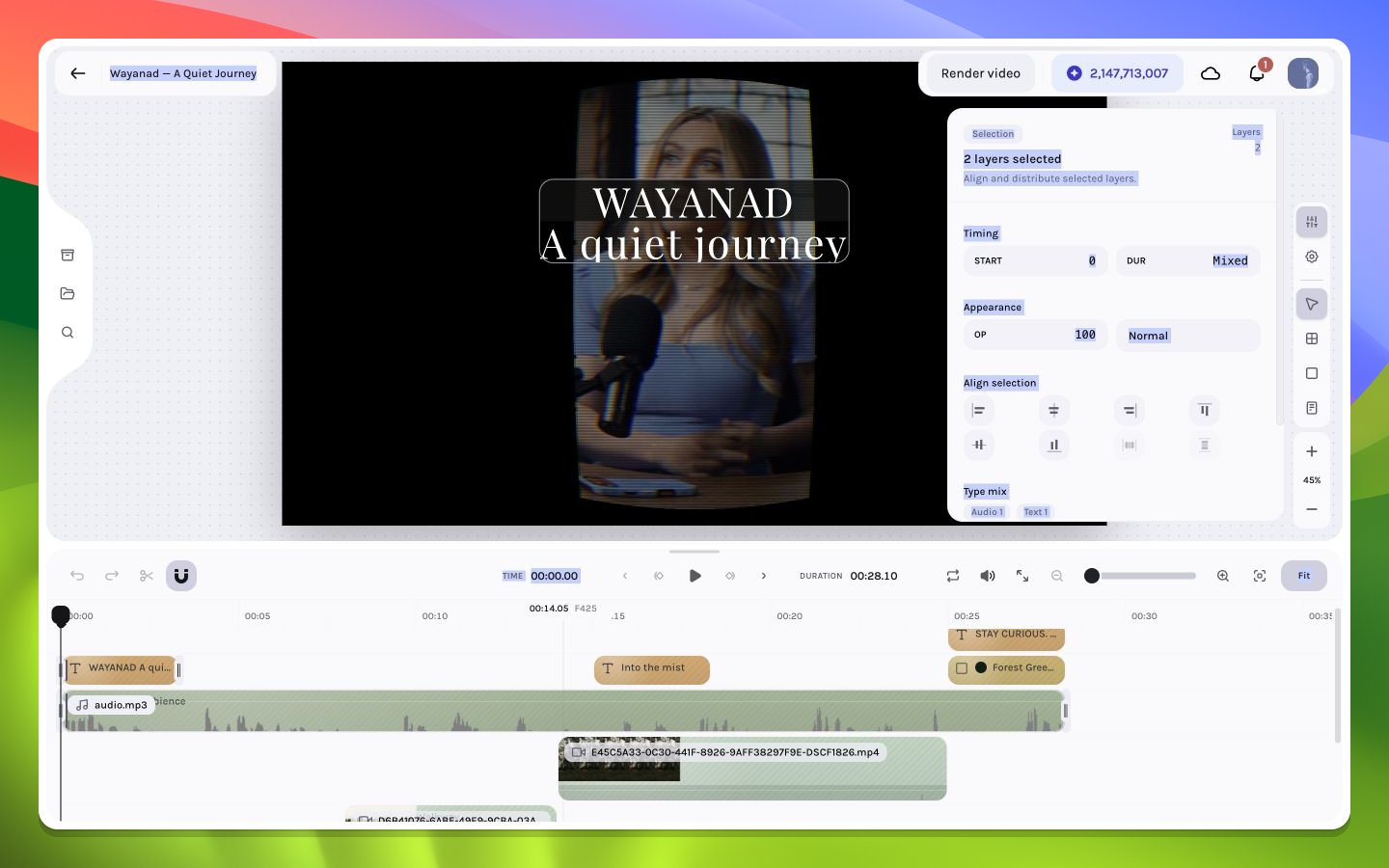
Apply coherent shared edits to several layers while respecting mixed values and type differences.
The multi-selection inspector appears when more than one scene layer is selected. It aggregates only controls that can be applied meaningfully to the current set.
A mixed field means at least two selected layers have different values. Entering a new value deliberately normalizes the property across all eligible layers. Do not mistake a blank or mixed indicator for zero.
Changing a shared start raw-assigns that base frame to each eligible layer; changing duration raw-assigns the same frame duration. These inspector fields do not run the collision, hierarchy, source-range, fade-clamp, keyframe-shift, or caption-source-link propagation used by normal timeline move/trim commands. When preserving offsets and temporal invariants matters, drag or trim through the timeline instead.
Typography controls appear only when the selection supports them coherently. A video and text selection can share opacity and geometry but not font family. Unsupported fields are omitted rather than applied to incompatible layer types.
Bulk Start or Duration can create overlaps, strand absolute keyframes and fades outside a new interval, exceed available source media, or desynchronize linked captions. Bulk geometry fields also assign base properties and do not rewrite existing keyframe tracks. Expand every relevant lane and inspect source, hierarchy, fades, and links afterward—especially when animated and static layers are mixed.